How do I create a Payment Link by importing a CSV file?
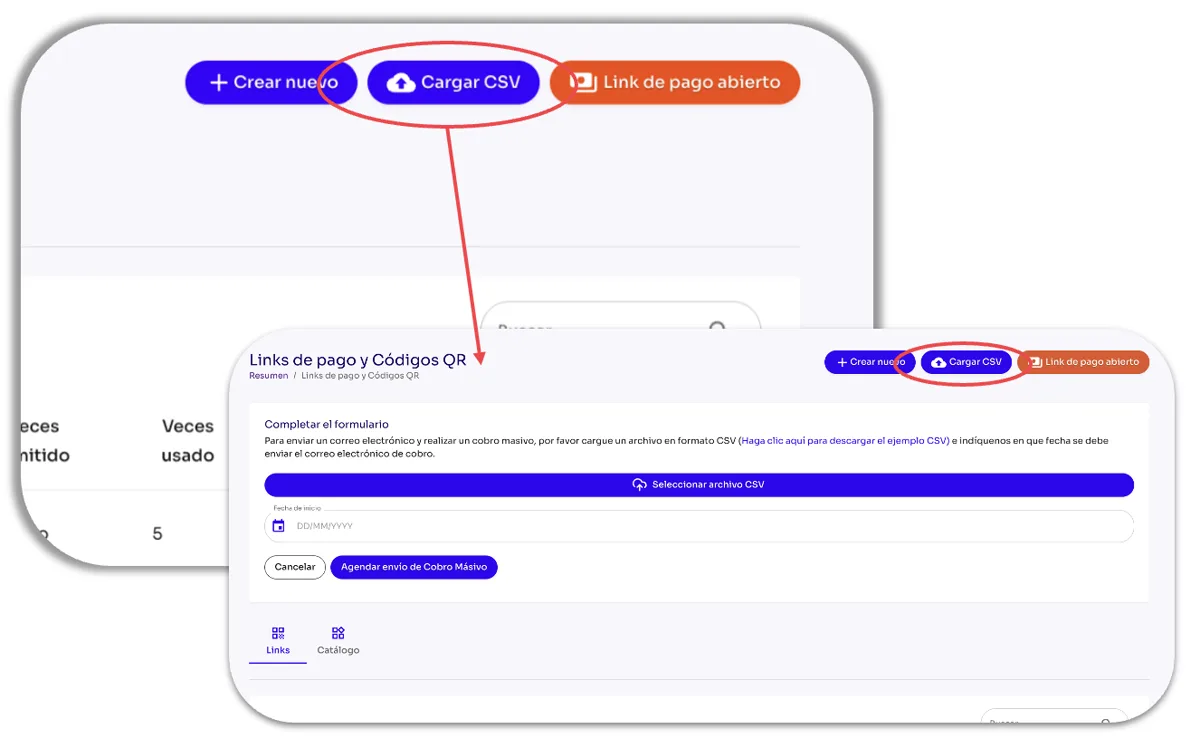
This option lets you create multiple Payment Links from a CSV file. Just click the Upload CSV button in the Tools module of the Tilopay Admin Dashboard, and complete the template with the required information:
Select CSV file: Click the Select CSV file button to find the CSV file containing the Payment Link information.
Start date: Enter the date when you want the email containing the Payment Link to be sent automatically to your customers.
Schedule Bulk Payment Request: Click the Schedule Bulk Payment Request button to schedule the emails containing the Payment Links based on the information in the CSV file.
The newly imported Payment Links will appear first in the Payment Links table and can only be used once.