How do I edit a plan in Subscription Payments?
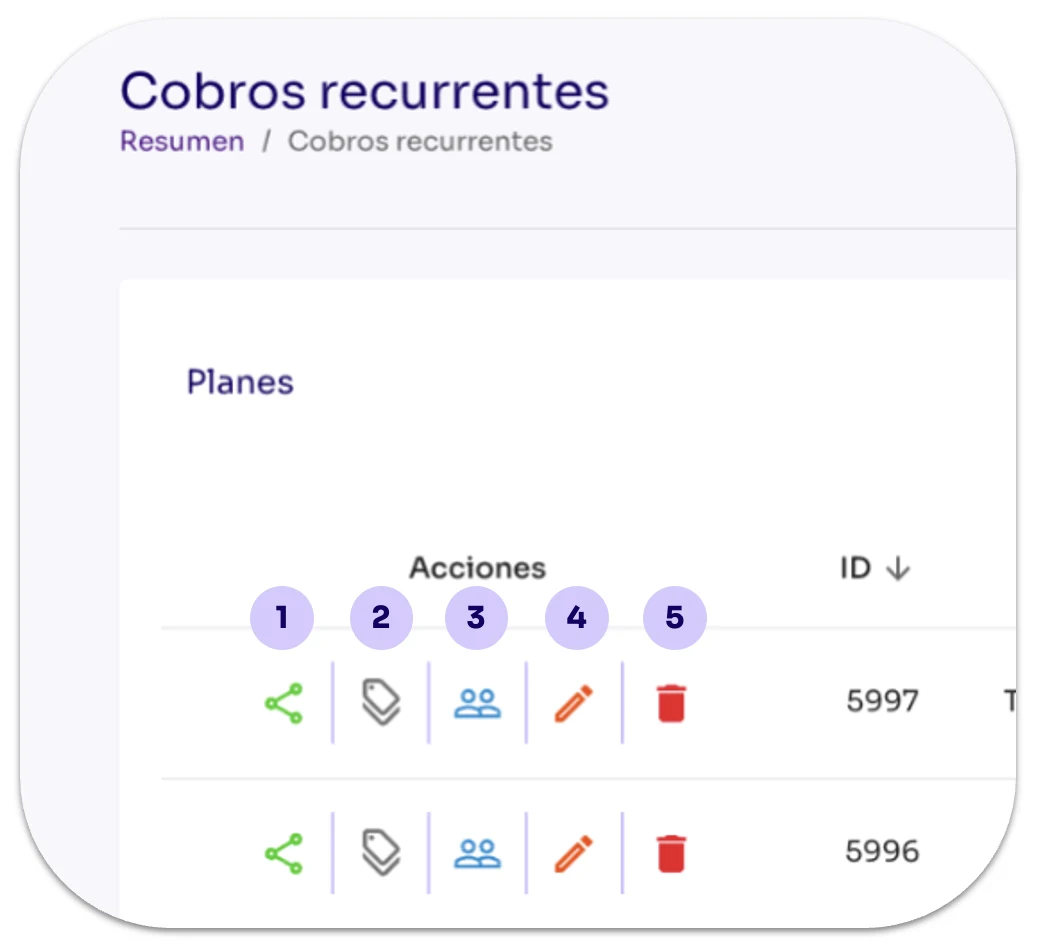
Share: Displays the different options available for sharing the selected Recurring Payment’s payment link with the customer.
To edit a Subscription Plan from the Tilopay Admin Panel, click the Actions: Edit button.
Log in to the Tilopay Admin Panel, go to the Tools section in the left-hand menu, then click the Recurring Payments module.
Select the Subscription Plan you already created and want to share, then click the Actions button:
The other Actions buttons are:
Share: Displays the different options available for sharing the selected Recurring Payment’s payment link with the customer.
Coupons or BIN discount: Displays the available options for creating coupons for the selected plan.
Subscribers: Displays the Subscribers’ information for that plan.
Edit recurring payment: Use this when you need to Edit the plan details.
Trash: Use this when you want to delete Recurring Payment records. This action CANNOT be undone.