
How do I change a subscriber’s billing option mid-cycle?
Change an active subscription’s billing option without canceling it. Tilopay prorates the charge, and the subscriber confirms the change by email.
From the Subscription Charges section of the Tilopay Admin Panel, you can change a subscriber’s billing option on an active subscription without canceling or resubscribing. When you do, Tilopay adjusts the charge based on how much of the current billing cycle has already been used (proration).
Requirement: this option only appears for subscribers whose plan has more than one billing option.
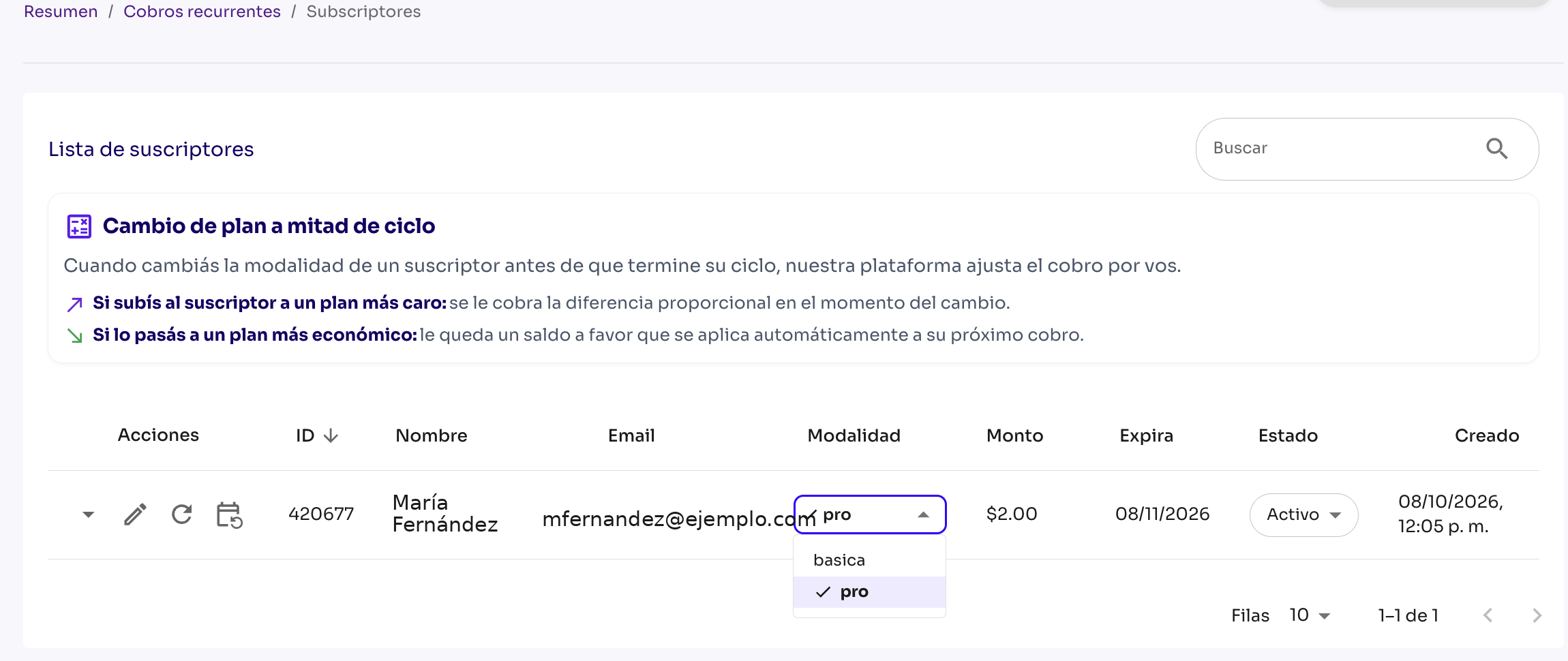
Steps
- In the Subscriber List, find the subscriber and change their billing option.
- You’ll see the change details: days in the cycle, credit for unused time, prorated charge for the new billing option, and the net difference.
- Send the request (or cancel if you don’t want to continue).
Cardholder confirmation
- After you send the request, the subscriber receives an email with a link to approve the change.
- The change only takes effect when the cardholder approves it. The link is unique and expires after 72 hours. The cardholder can also reject the change.
- Until the change is approved, the subscription remains on the original billing option, and no charge or account credit is generated.
- If there’s already a pending request, you can’t send another change for that subscriber until the request is resolved (you can resend the email).
How the charge is adjusted
- If you upgrade to a more expensive billing option: once approved, the prorated difference is charged.
- If you switch to a less expensive billing option: no money is refunded to the card. An account credit is applied automatically to the next renewal.
Example: your current billing option is $10 (daily cycle), and you switch to $8. You receive a $2 credit, so you’re charged $6 instead of $8 at the next renewal.
Keep in mind: you can only switch between billing options in the same currency.