¿Cómo genero un Link de Pago importando un CSV?
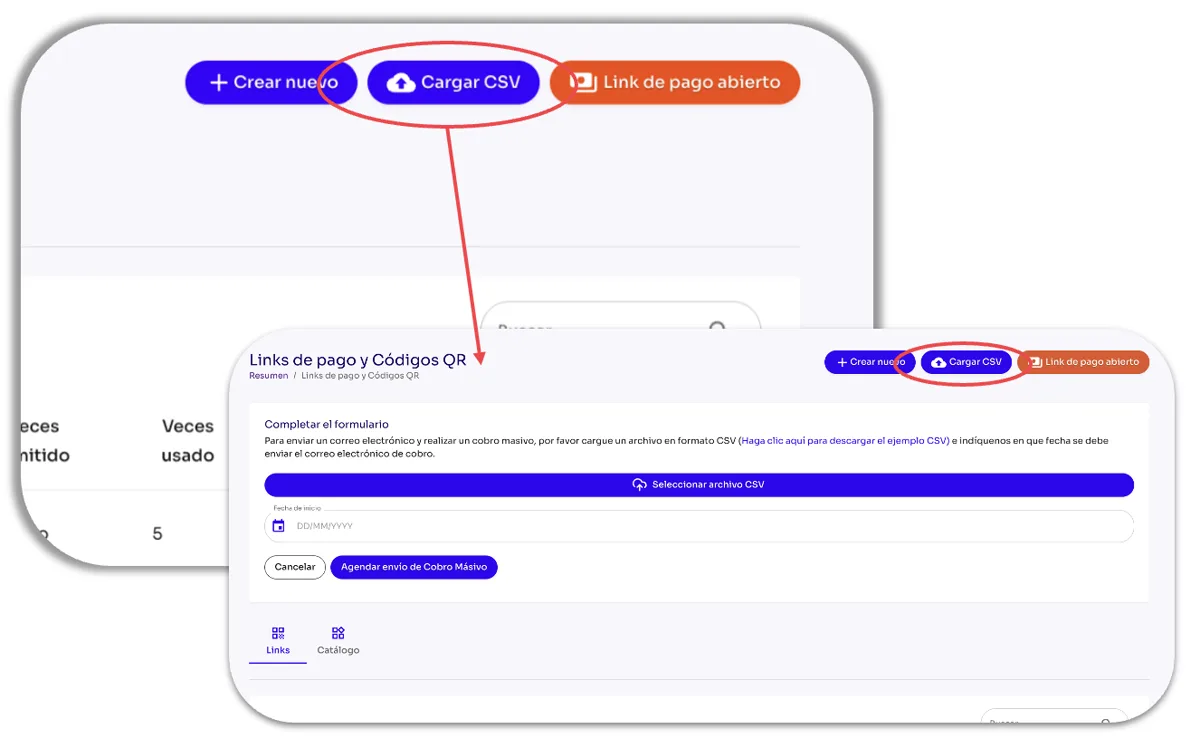
Esta es la opción que tienes disponible para crear múltiples Links de Pago desde un archivo CSV. Sólo haz clic en el botón Cargar CSV desde el módulo de Herramientas en el Panel Administrativo de Tilopay, y completa la plantilla con la información que te requiere:
Seleccionar archivo CSV: Con el botón Seleccionar archivo CSV buscas el archivo en formato CSV con la información de los Links de Pago.
Fecha de inicio: En este campo indicas la fecha en que deseas que se envíe el correo con el Link de Pago a tus clientes de forma automática.
Agendar envío de Cobro Masivo: Al darle clic al botón Agendar envío de Cobro Masivo, programas el envío de los correos con los Links de Pago según la información del archivo CSV .
Los Links de Pago recién importados aparecerán primeros en la tabla de Links de Pago y sólo se pueden utilizar una vez.