¿Cómo comparto un Link de Pago?
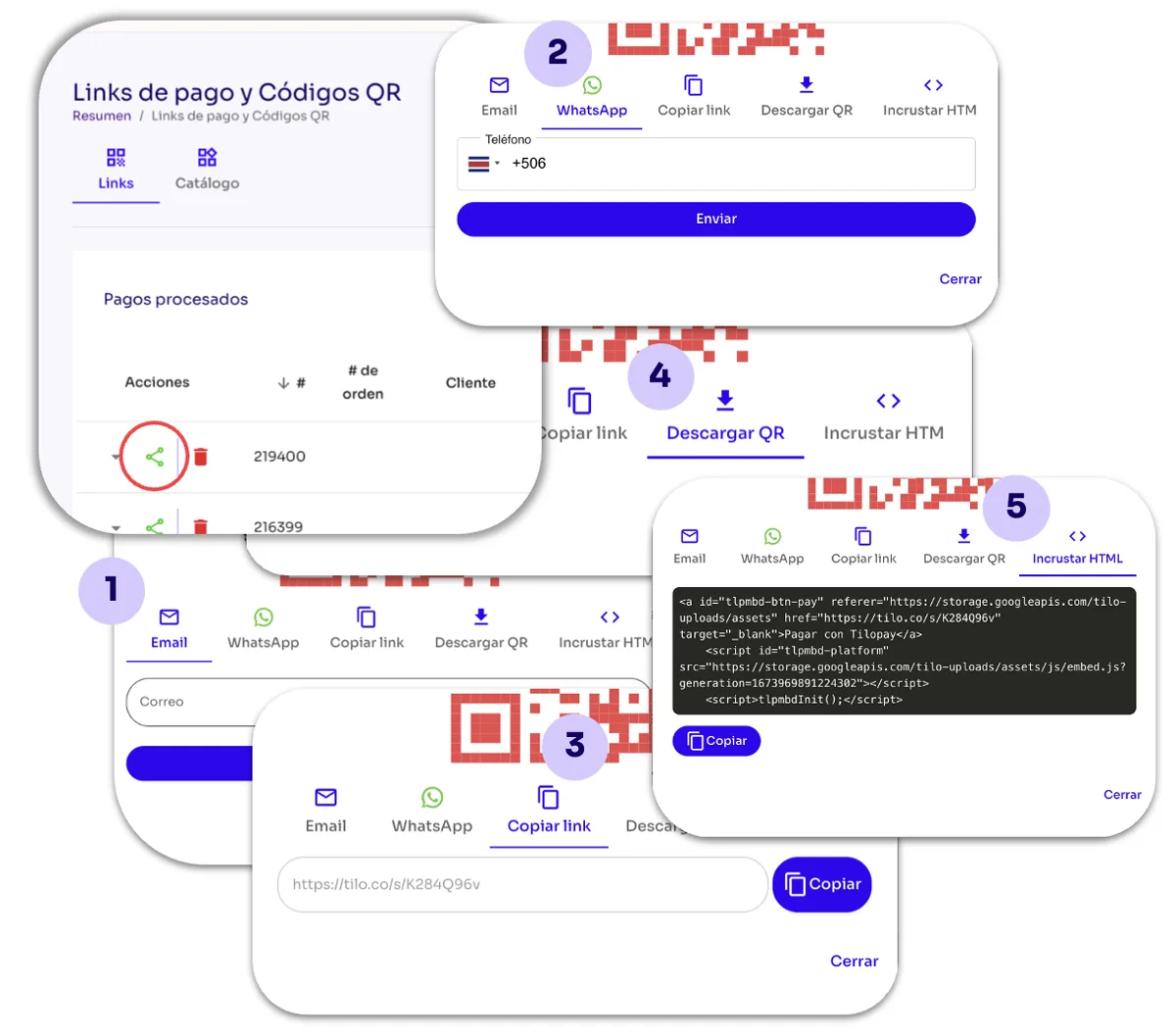
Cuando ya has creado el Link de Pago haz clic en el botón de Acciones Compartir para que tengas acceso a los diferentes medios disponibles:
Para compartir un Link de Pago desde el Panel Administrativo de Tilopay, dirígete a la sección Herramientas en el menú de la izquierda, luego haz clic en el módulo Link de Pago y Códigos QR.
Selecciona el Link de Pago ya generado y que quieres compartir y haz clic en el botón de Acciones: Compartir. Esto te dará ofrecerá los diferentes medios disponibles:
Email: Ingresas el correo electrónico de tu cliente o clientes separados por una coma (,).
WhatsApp: Ingresa el código del país y el número de teléfono de tu cliente.
Copiar link: Tal como lo dice su nombre, con esta opción copias el link para enviarlo.
Descargar QR: Tal como lo dice su nombre, con esta opción descargas el código QR para que tus clientes puedan escanearlo con su dispositivo móvil.
Incrustar HTML: Aquí se despliega el código del link.