
How do you integrate the Tilopay V2 SDK?
Design a unique payment flow that delivers a smooth, frictionless checkout experience while maintaining the reliability and security Tilopay is known for, helping you maximize sales. This specific integration is designed for anyone with basic or intermediate HTML and JavaScript skills. You’ll have everything you need to integrate our technology and give your customers peace of mind with every click. Prefer something simpler? No worries—we also offer ready-to-use solutions that don’t require a single line of code.
Step 1:
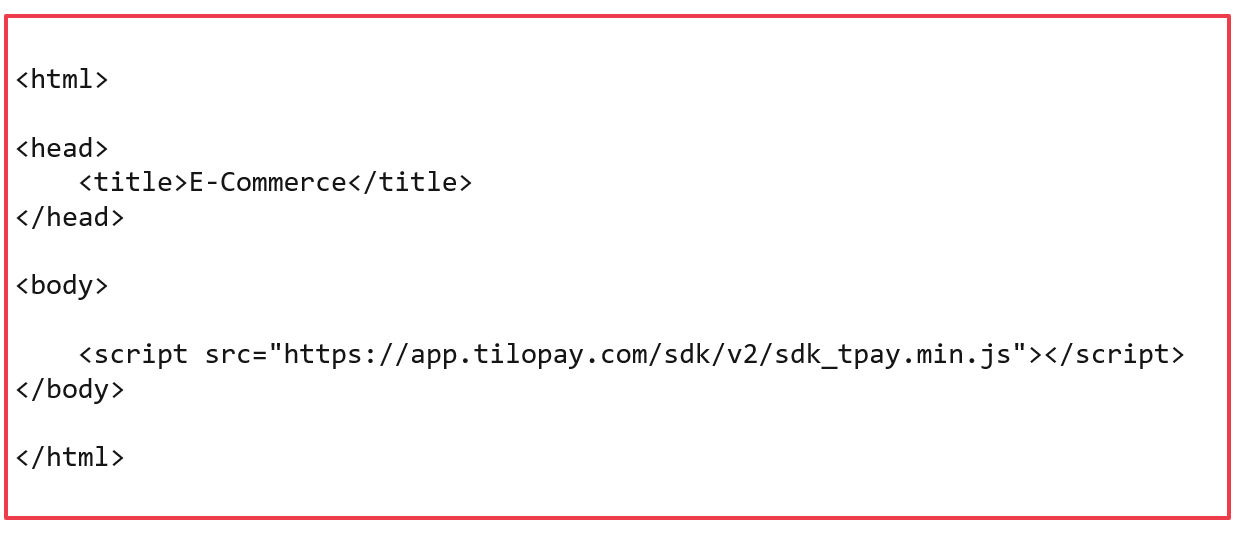
Import the required libraries. Here, you can set the design, colors, and styles you want to match your platform. The jQuery library and Tilopay SDK are required:
https://app.tilopay.com/sdk/v2/sdk_tpay.min.js
Step 2:
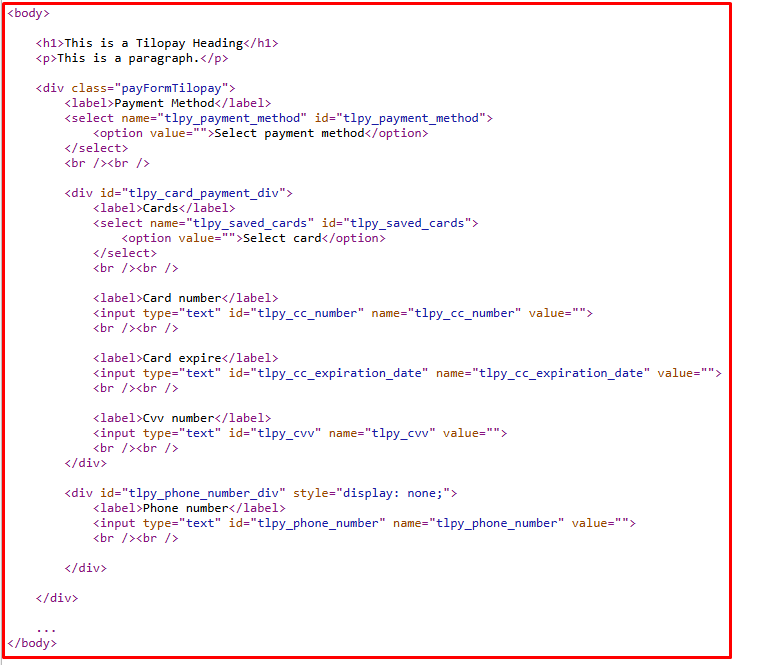
Create the required structure for the payment details. The required fields are:
tlpy_payment_method
This field can be a text or select field. Its value must contain the payment method ID obtained from Tilopay. You can show or hide it at your discretion.
tlpy_saved_cards
This field must be a select field. Its value must contain the saved card ID obtained from Tilopay. If there are no saved cards, you must hide it from the user.
tlpy_cc_number
A text field where the user enters the card number.
tlpy_cc_expiration_date
A text field where the user enters the expiration date in month/year format (01/25).
tlpy_cvv
A text field where the user enters the card security code.
tlpy_phone_number
A field where the user enters their Yappy phone number when using Yappy as the payment method. Otherwise, you must hide it.
Required
These fields must be inside a main div with the class “payFormTilopay.” This div must also contain two divs: one with the ID “tlpy_card_payment_div” for card details and another with the ID “tlpy_yappy_payment_div” for Yappy details. This makes it easier to display the appropriate options based on the selected payment method.
Example of how the HTML structure should look:
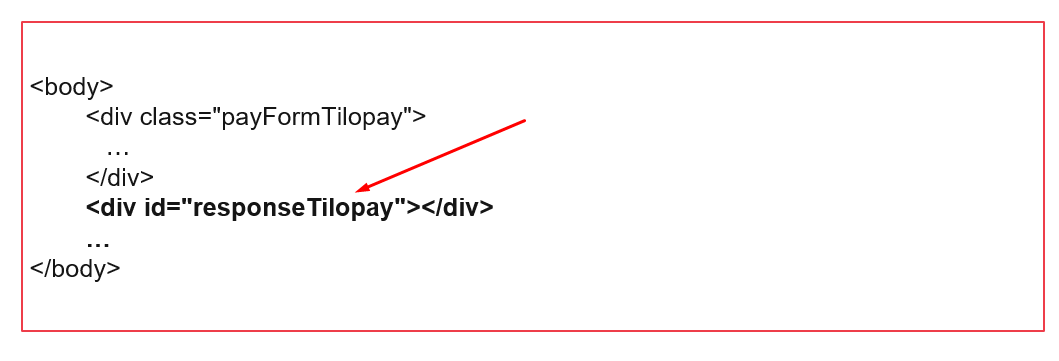
You must also add a container with the ID “responseTilopay.” It will handle the 3DS process if required by the payment method.
Step 3:
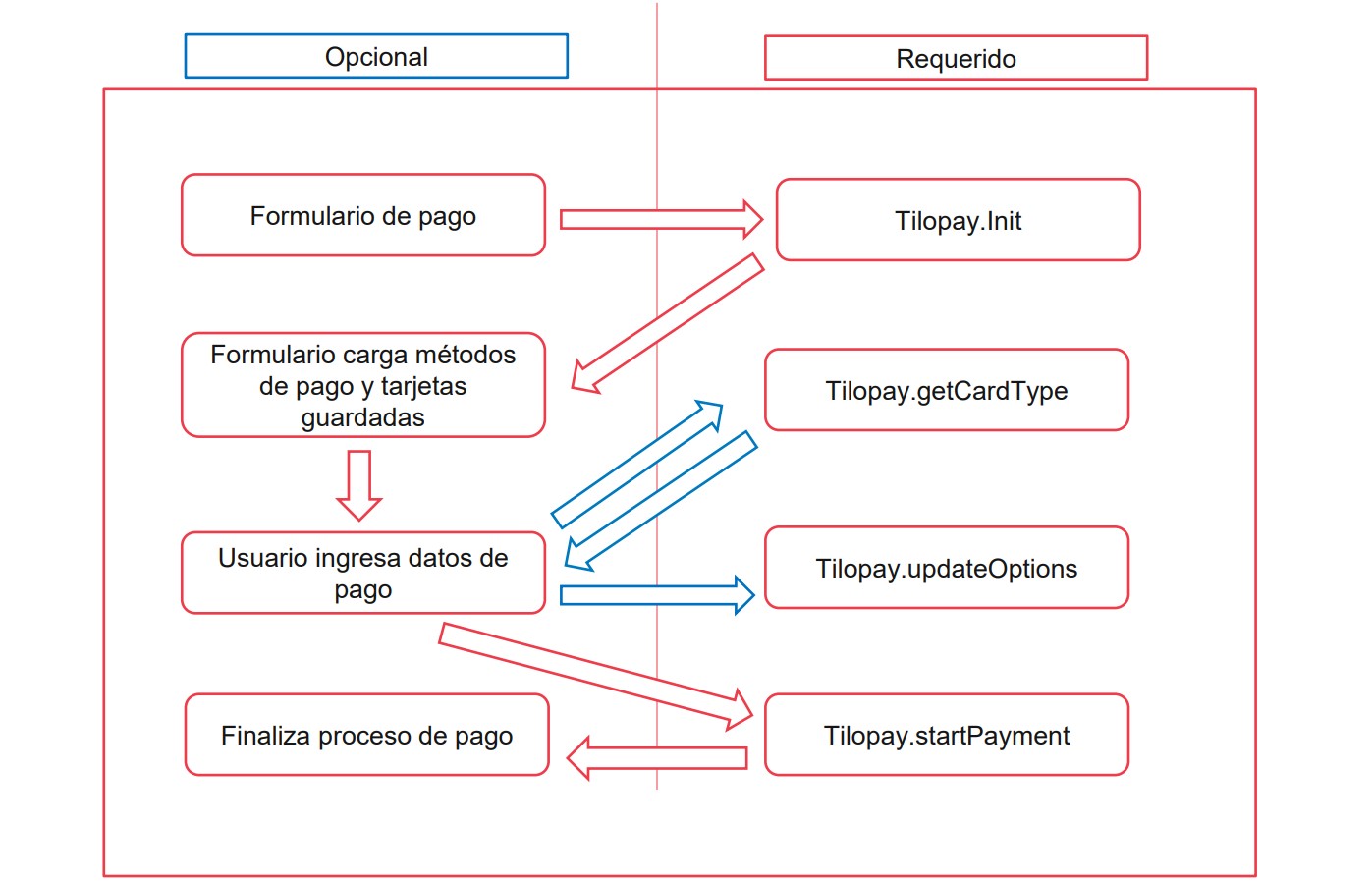
Implement the interaction with the Tilopay SDK. Several functions are available to manage the Tilopay checkout process:
Function: await Tilopay.Init()
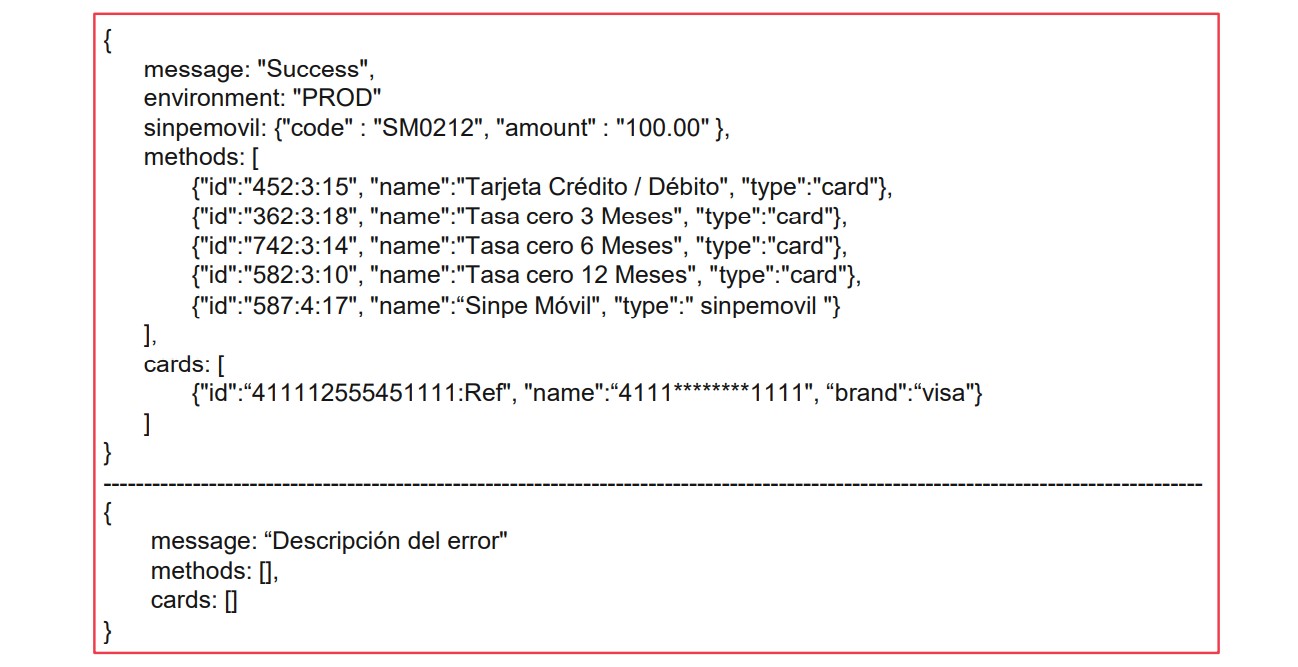
Initializes the payment method and accepts several parameters. It returns an error message, if applicable, along with the available payment methods.
Function: await Tilopay.getCardType()
Gets the type of card entered by the user. It returns the card type: Visa, Mastercard, or American Express.
Function: await Tilopay.getSinpeMovil()
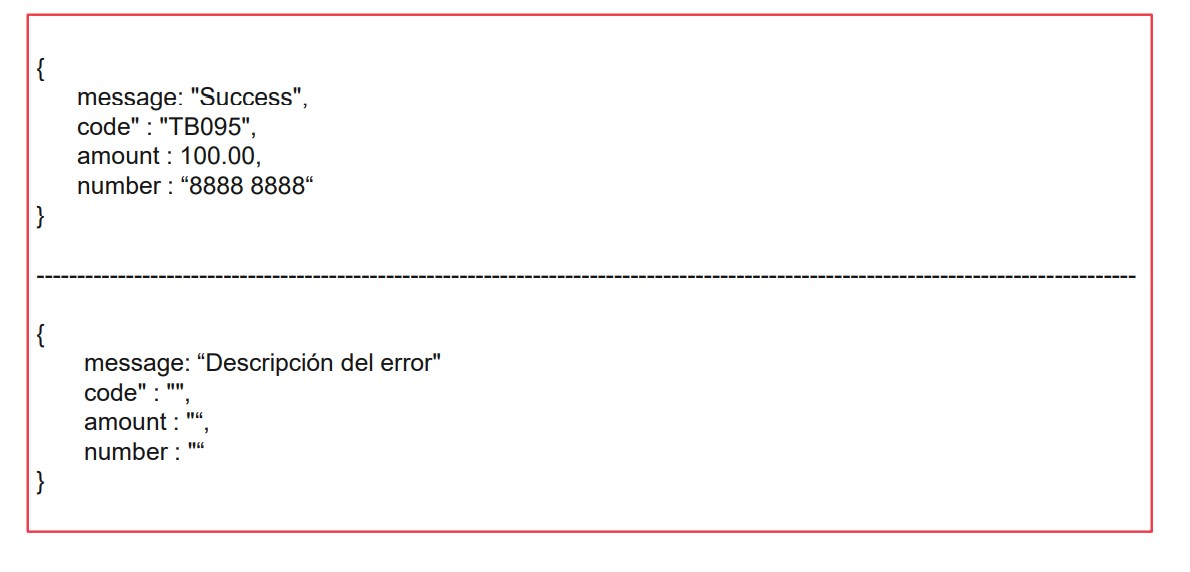
Gets the payment details for the SINPE Móvil payment method. It returns an error message, if applicable, along with the SINPE Móvil parameters.
Function: await Tilopay.updateOptions()
If necessary, you can use this method to reload the values required to process the payment. It returns a Success message or a description of the error.
Function: await Tilopay.startPayment()
Sends the payment to Tilopay for processing. It does not accept any parameters. It returns an error message, if applicable.
Function: await Tilopay.Init()
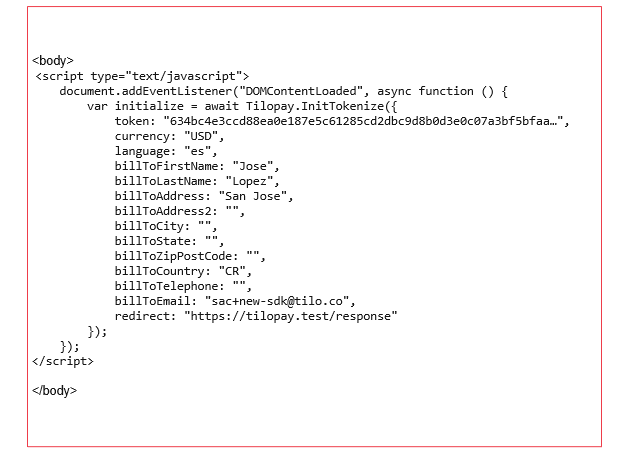
The await Tilopay.Init() function starts the Tilopay checkout process. It handles authentication and returns the payment methods available for the purchase. It accepts the following parameters:
token
Required string field. Token obtained from the GetTokenSdk method in the Tilopay API.
currency
Required string field with a length of 3 characters. ISO 4217 currency code, such as CRC or USD. The currency of the purchase.
language
Required string field with a length of 2 characters. ISO 639-1 code, such as en or es. The language of the purchase.
amount
Required decimal field with a length of 12,2 characters. The purchase amount.
billToEmail
Required string field. The customer's email address.
orderNumber
Required string field that can be alphanumeric. Its value must be unique and cannot be reused by the merchant. Order number examples: 1001, TPY-1001, xbkshHwqrKjs98.
typeDni
Conditionally required integer field. Identification type (required for SINPE Móvil). See the identification types table.
dni
Conditionally required string field. The customer's identification number (required for SINPE Móvil).
billToFirstName
Required string field. The customer's first name.
billToLastName
Required string field. The customer's last name.
billToAddress
Required string field. The customer's address line 1.
billToAddress2
Optional string field. The customer's address line 2.
billToCity
Recommended string field. The customer's city.
billToState
Recommended string field. The customer's state.
billToZipPostCode
Recommended string field. The customer's ZIP or postal code.
billToCountry
Recommended string field. The customer's country as a two-character ISO 3166-1 code, such as CR, FR, or PA.
billToTelephone
Recommended string field. The customer's phone number.
capture
Required integer field. Indicates whether you want to authorize the purchase using 0 (zero) or capture it using 1 (one).
redirect
Required string field. The URL (callback) where you expect to receive the final purchase response.
subscription
Required integer field. Indicates whether the customer wants to save their card in Tilopay: 1 (one) for yes or 0 (zero) for no.
phoneYappy
Required field when the customer wants to pay with Yappy.
Example call to the await Tilopay.Init() method
Example response from the await Tilopay.Init() method
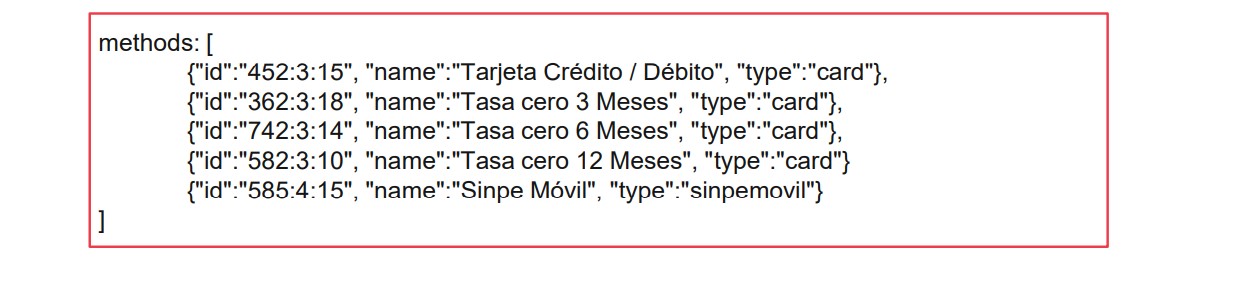
Payment methods
The merchant's available payment methods will be listed so the customer can complete the payment. These may include card payments, Yappy, and SINPE Móvil.
User's saved cards
The user's available cards will be listed so they can complete the payment.
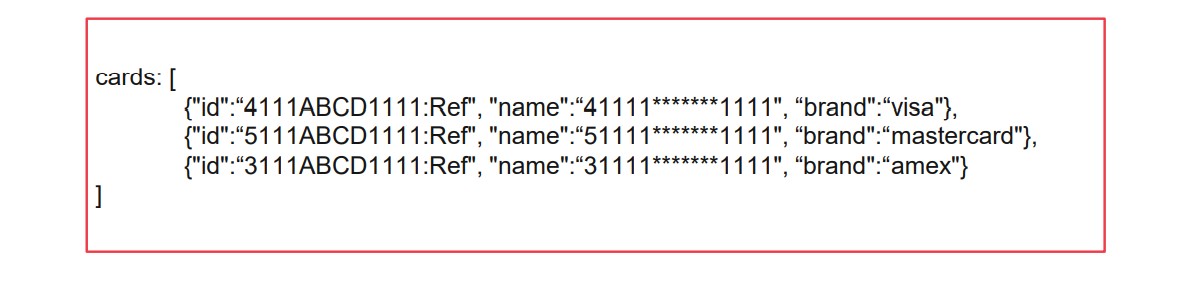
You must display the cards so the user can select one or enter the details for a new card. The select field for the cards must have the ID cards.
When the customer uses a saved card, you must enable the CVV field so they can enter the card's security code.
To retrieve the customer's cards, you must send the billToEmail parameter with the customer's email address when calling the Tilopay.Init() method. After retrieving the cards, you cannot change the user's email address through the Tilopay.updateOptions() method.
Identification types
If you offer SINPE Móvil payment methods, you must ask the user for their identification type and identification number and pass both to the SDK. This helps identify the user's payment more quickly.
Code 1:
Type: national ID card, format: 0#-####-####, length: 10.
Code 2:
Type: legal entity ID, format: 3-###-######, length: 10.
Code 3:
Type: central government, format: 2-###-######, length: 10.
Code 4:
Type: autonomous institution, format: 4-###-######, length: 10.
Code 5:
Type: nonresident foreign national, format: 9&&&&&&&&&&&&&&&&&&&, length: 20.
Code 6:
Type: DIMEX, format: 1########### length: 12.
Code 7:
Type: DIDI, format: 5########### length: 12.
SINPE Móvil
To ensure SINPE Móvil works correctly, you must follow some rules that differ from card payments.
Send the typeDni and dni parameters through the await Tilopay.Init() or await Tilopay.updateOptions() method.
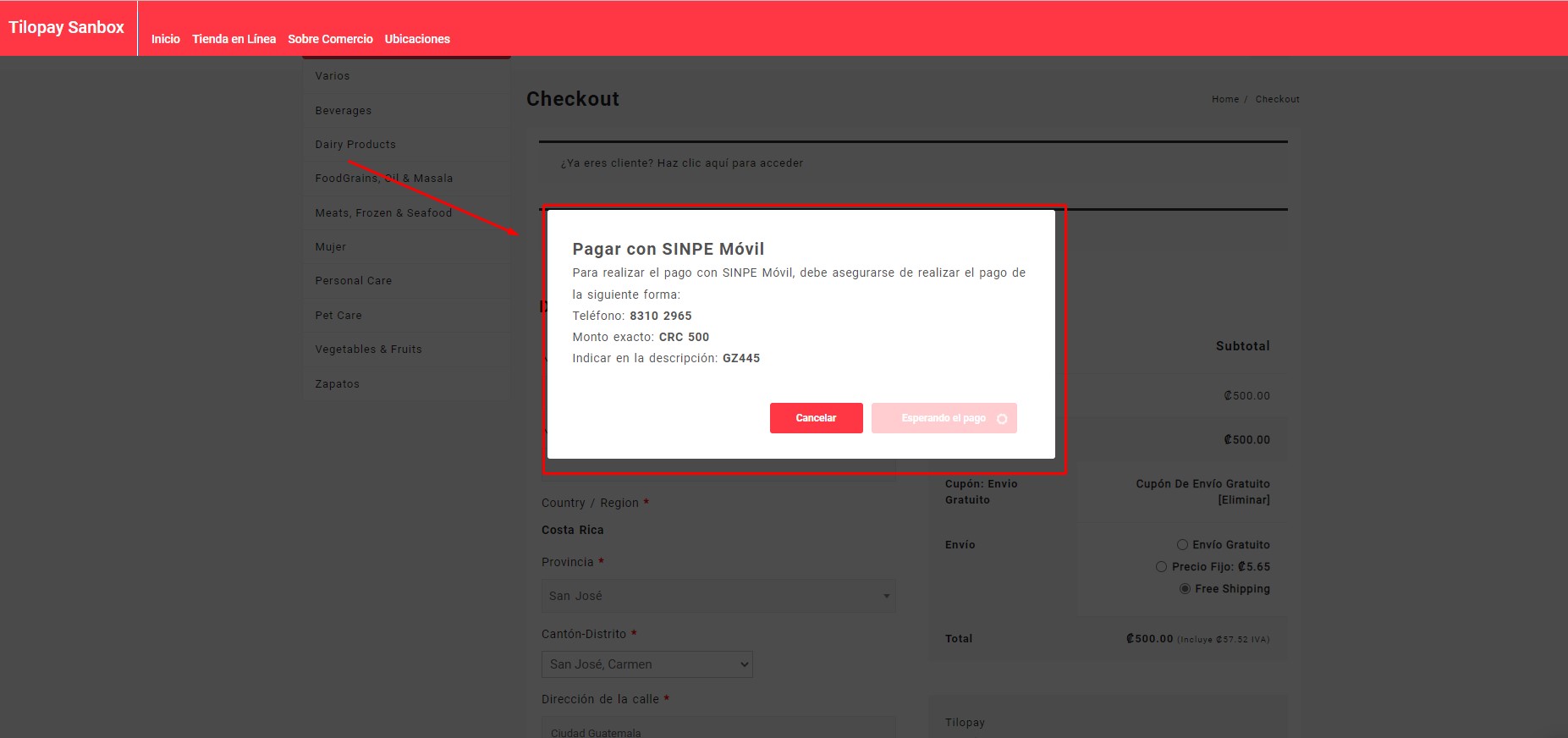
Hide the card payment fields and instead show the user the SINPE Móvil payment parameters returned by the await Tilopay.getSinpeMovil() method. We recommend displaying these parameters with a message similar to the following:
To pay with SINPE Móvil, make sure you submit the payment as follows:
Phone number: 8888 8888
Exact amount: CRC 500,00
Enter in the description: TB095
You do not need a payment button for SINPE Móvil. The payment processes automatically when the customer's transaction is received.
Function await Tilopay.getCardType()
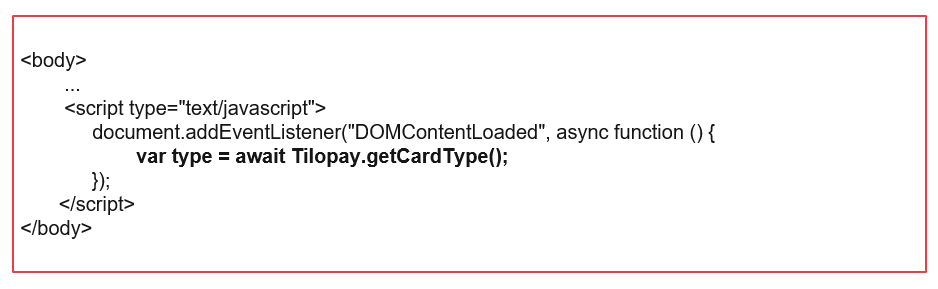
The await Tilopay.getCardType() function gets the type of card entered by the customer. You can use it to show the customer an icon for the card type they are using. The customer must have already entered the card number. This method does not require any parameters. It returns a message containing the corresponding card brand.
Supported cards:
VISA, MASTERCARD, AMEX.
Unsupported cards
ELO, VISAELECTRON, MAESTRO, FORBRUGSFORENINGEN, DANKORT, HIPERCARD, DINERSCLUB, DISCOVER, UNIONPAY, JCB, LASER.
Example call to the await Tilopay.getCardType() method
Example response from the await Tilopay.getCardType() method

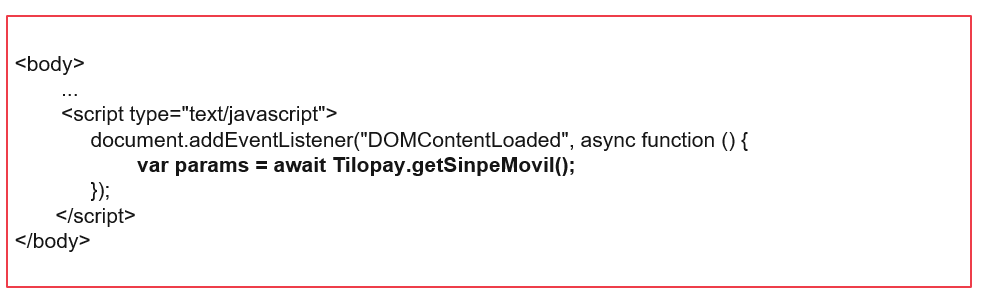
The await Tilopay.getSinpeMovil() function retrieves the details you must show the user so they can pay with SINPE Móvil. To use it, the user must select SINPE Móvil as their payment method.
Example call to the await Tilopay.getSinpeMovil() method
Example response from the await Tilopay.getSinpeMovil() method
Function await Tilopay.updateOptions()
You can use the await Tilopay.updateOptions() function to update parameters from the await Tilopay.Init() method that may have changed. If needed, use it before completing the payment. Its use is optional. You can update the following values:
typeDni
Conditionally required integer field. Identification type (required for SINPE Móvil). See the identification types table.
dni
Conditionally required string field. The customer's identification number (required for SINPE Móvil).
billToFirstName
Required string field. The customer's first name.
billToLastName
Required string field. The customer's last name.
billToAddress
Required string field. The customer's address line 1.
billToAddress2
Optional string field. The customer's address line 2.
billToCity
Recommended string field. The customer's city.
billToState
Recommended string field. The customer's state.
billToZipPostCode
Recommended string field. The customer's ZIP or postal code.
billToCountry
Recommended string field. The customer's country as a two-character ISO 3166-1 code, such as CR, FR, or PA.
billToTelephone
Recommended string field. The customer's phone number.
capture
Required integer field. Indicates whether you want to authorize the purchase using 0 (zero) or capture it using 1 (one).
redirect
Required string field. The URL (callback) where you expect to receive the final purchase response.
subscription
Required integer field. Indicates whether the customer wants to save their card in Tilopay: 1 (one) for yes or 0 (zero) for no.
phoneYappy
Required field when the customer wants to pay with Yappy.
Example call to the await Tilopay.updateOptions() method
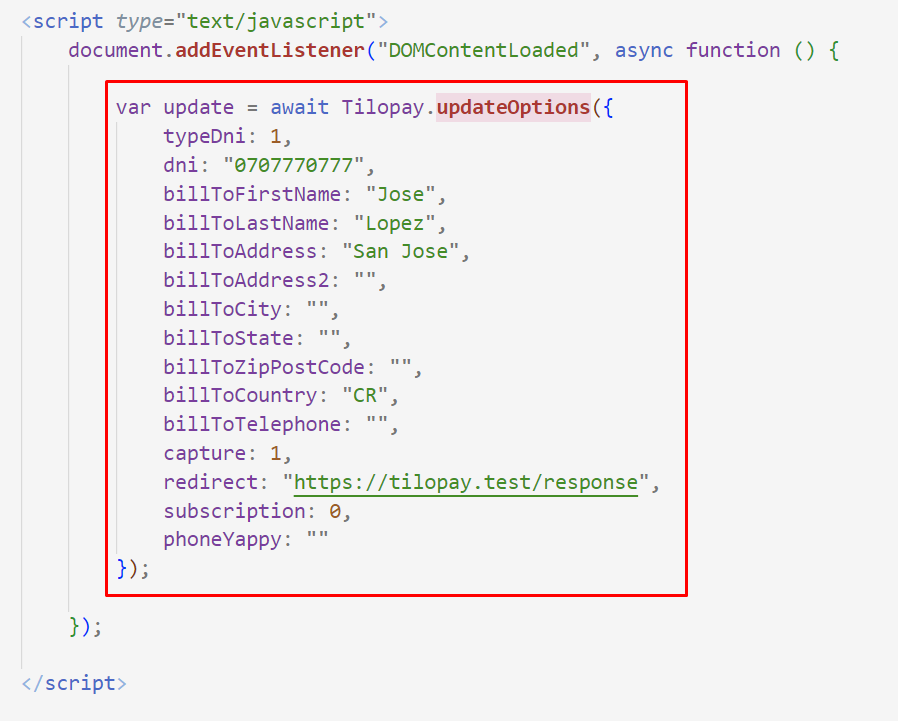
Example response from the await Tilopay.updateOptions() method

Function await Tilopay.startPayment()
The await Tilopay.startPayment() function completes the checkout process by sending the payment details to Tilopay for processing. If an error occurs, this method returns the error. All payment details must be complete, but the method does not require any parameters when called.
Example call to the await Tilopay.startPayment() method
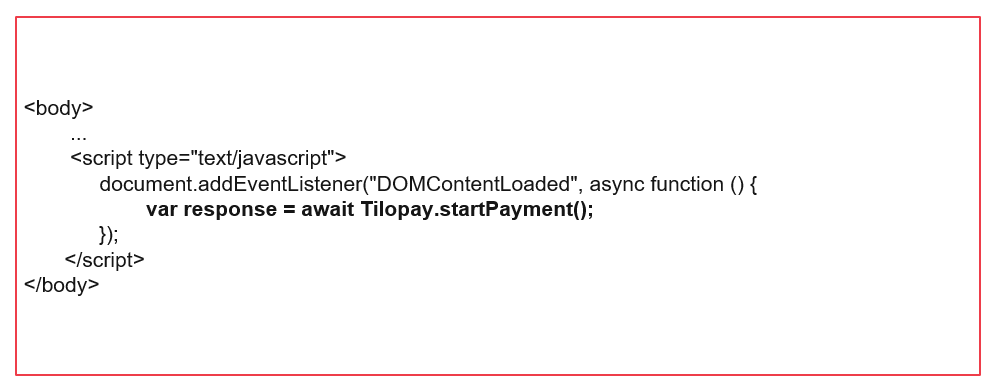
Complete example of the V2 SDK async/await integration:
<html>

<head>
    <title>Tilopay SDK DEMO | Basic Form</title>
</head>

<body>

    <h1>This is a Tilopay Heading</h1>
    <p>This is a paragraph.</p>

    <div class="payFormTilopay">
        <label>Payment Method</label>
        <select name="tlpy_payment_method" id="tlpy_payment_method">
            <option value="">Select payment method</option>
        </select>
        <br /><br />

        <div id="tlpy_card_payment_div">
            <label>Cards</label>
            <select name="tlpy_saved_cards" id="tlpy_saved_cards">
                <option value="">Select card</option>
            </select>
            <br /><br />

            <label>Card number</label>
            <input type="text" id="tlpy_cc_number" name="tlpy_cc_number" value="">
            <br /><br />

            <label>Card expire</label>
            <input type="text" id="tlpy_cc_expiration_date" name="tlpy_cc_expiration_date" value="">
            <br /><br />

            <label>Cvv number</label>
            <input type="text" id="tlpy_cvv" name="tlpy_cvv" value="">
            <br /><br />
        </div>

        <div id="tlpy_phone_number_div" style="display: none;">
            <label>Phone number</label>
            <input type="text" id="tlpy_phone_number" name="tlpy_phone_number" value="">
            <br /><br />

        </div>

        <input type="button" onclick="processPayment();" value="Pay">
        <input type="button" onclick="updateTilopaySDKOptions();" value="Reload">
        <input type="button" onclick="getCardBrand();" value="Get Type">
        <input type="button" onclick="getSinpeMovilInstructionsToPay();" value="Get Sinpe Data">
        <input type="button" onclick="getCipherData();" value="Get Cipher Data">
    </div>

    <div id="responseTilopay"></div>

    <!-- First option, as usual -->
    <script src="https://app.tilopay.com/sdk/v2/sdk_tpay.min.js"></script>
    <!-- Second option, recommend if you want avoid cache or are integrate angular or similar framework-->
    <!-- <script>
        var tlpy_SDK_script = document.createElement('script');
        tlpy_SDK_script.src = "https://app.tilopay.com/sdk/v2/sdk_tpay.min.js?v=" + Date.now();
        document.body.appendChild(tlpy_SDK_script);
    </script> -->

    <script type="text/javascript">

        // SDK on Ready document
        document.addEventListener("DOMContentLoaded", async function () {

            // Initialize Tilopay SDK
            var initialize = await Tilopay.Init({
                token: '',
                currency: "USD",
                language: "es",
                amount: 1,
                billToFirstName: "Jose",
                billToLastName: "Lopez",
                billToAddress: "San Jose",
                billToAddress2: "",
                billToCity: "",
                billToState: "",
                billToZipPostCode: "",
                billToCountry: "CR",
                billToTelephone: "",
                billToEmail: "your-email@example.com",
                orderNumber: "sdk-" + Date.now(),
                capture: 1,
                redirect: "https://tilopay.test/response",
                subscription: 0,
                hashVersion: "V2",
                returnData: "W2N1c3RvbV9wYXJhbWV0ZXJfYSA9PiAidmFsb3IgZGUgYSIsY3VzdG9tX3BhcmFtZXRlcl9iID0+ICJ2YWxvciBkZSBiIl0=" // base 64 array [custom_parameter_a => "valor de a",custom_parameter_b => "valor de b"]
            });

            await loadPaymentMethodsOptions(initialize.methods);
            await loadCardOptions(initialize.cards);

            /**
             * Called when the user changes the payment method.
             * If the new method is Yappy, hide the card number, expiration and CVV
             * inputs and show the phone number input. Otherwise, show the card
             * number inputs and hide the phone number input.
             * @param {Event} e The change event.
             */
            document.getElementById("tlpy_payment_method").onchange = async function (e) {
                var method = document.getElementById("tlpy_payment_method").value;
                if (method) {
                    const splitMethods = method.split(':');
                    const showInputs = (splitMethods[1] == '18');
                    const tlpy_card_payment_div = document.getElementById("tlpy_card_payment_div");
                    if (tlpy_card_payment_div && showInputs) {
                        tlpy_card_payment_div.style.display = 'none';
                    } else {
                        tlpy_card_payment_div.style.display = 'block';
                    }
                    const tlpy_phone_number_div = document.getElementById("tlpy_phone_number_div");
                    if (tlpy_phone_number_div && showInputs) {
                        tlpy_phone_number_div.style.display = 'block';
                        // Update phone yappy to process the payment
                        await setYappyPhone();
                    } else {
                        tlpy_phone_number_div.style.display = 'none';
                    }
                }

            };

        });

        /**
         * Function to update the yappy phone number in the Tilopay object
         * This function is called when the user change the phone number in the form
         * @return {Promise<void>}
         */
        async function setYappyPhone() {
            document.getElementById("tlpy_phone_number").onchange = async function () {
                var phone = document.getElementById("tlpy_phone_number").value;
                if (phone) {
                    var update = await Tilopay.updateOptions({
                        phoneYappy: document.getElementById("tlpy_phone_number").value,
                    });
                }
            }
        }

        /**
         * Example of how to get the card brand
         * @return {Promise<string>}
         */
        async function getCardBrand() {
            console.log(await Tilopay.getCardType());
        }

        /**
         * Function to update the options for the Tilopay object
         * This function is called when the user clicks on the "Update options" button
         * @return {Promise<void>}
         */
        async function updateTilopaySDKOptions() {
            var update = await Tilopay.updateOptions({
                typeDni: 1,
                dni: "07-0777-0777",
                billToFirstName: "Jose",
                billToLastName: "Lopez",
                billToAddress: "San Jose",
                billToAddress2: "",
                billToCity: "",
                billToState: "",
                billToZipPostCode: "",
                billToCountry: "CR",
                billToTelephone: "",
                billToEmail: "dcordero@tilo.co",
                orderNumber: "1",
                capture: 1,
                redirect: "https://tilopay.test/response",
                subscription: 0
            });
        }

        /**
         * Populates the payment method dropdown with options.
         *
         * @param {Array} methods - An array of payment method objects, each containing an 'id' and 'name'.
         * The function creates an <option> element for each method and appends it to the select element
         * with the id "tlpy_payment_method".
         */
        async function loadPaymentMethodsOptions(methods) {
            methods.forEach(function (method) {
                var option = document.createElement("option");
                option.value = method.id;
                option.text = method.name;
                document.getElementById("tlpy_payment_method").appendChild(option);
            });
        }

        /**
         * Populates the saved card dropdown with options.
         *
         * @param {Array} cards - An array of card objects, each containing an 'id' and 'name'.
         * The function creates an <option> element for each card and appends it to the select element
         * with the id "tlpy_saved_cards".
         */
        async function loadCardOptions(cards) {
            cards.forEach(function (card) {
                var option = document.createElement("option");
                option.value = card.id;
                option.text = card.name;
                document.getElementById("tlpy_saved_cards").appendChild(option);
            });
        }

        /**
         * Function to get the instructions to pay with sinpe movil
         *
         * This function will return the instructions to pay with sinpe movil, it will return an object with the following properties:
         * - message: A string with the instructions to pay with sinpe movil
         * - code: A string with the code of the payment
         * - amount: A number with the amount of the payment
         * - number: A string with the number of the payment
         *
         * It will console.log the instructions to pay with sinpe movil
         *
         * @return {Promise<void>}
         */
        async function getSinpeMovilInstructionsToPay() {
            var params = await Tilopay.getSinpeMovil();
            console.log(params);
        }

        /**
         * Processes the payment.
         *
         * This function will call the Tilopay.startPayment() method and log the response to the console.
         *
         * @return {Promise<void>}
         */
        async function processPayment() {
            var payment = await Tilopay.startPayment();
            console.log(payment);
        }

        /**
         * Get the cipher data.
         *
         * This function will call the Tilopay.getCipherData() method and log the response to the console.
         *
         * @return {Promise<void>}
         */
        async function getCipherData() {
            var cipher = await Tilopay.getCipherData();
            console.log(cipher);
        }
    </script>

</body>

</html>