
How to Sell Online Without a Website Using Payment Links During Peak Season
Equipo Tilopay · 9 de noviembre de 2026

With Tilopay Payment Links, your business can accept payments through WhatsApp, social media, or at fairs without a website. Learn how to create them, customize your checkout, use QR Codes, and generate links from the App or WhatsApp Assistant for Black Friday, Cyber Monday, and Christmas.
The biggest sales season of the year is approaching, bringing new opportunities for businesses. Black Friday, Cyber Monday, and Christmas are times when many customers search for products, compare options, and expect to complete their purchases quickly and easily. During these weeks, getting ready means more than just planning promotions: you also need a way to accept payments as inquiries and orders increase.
Imagine a customer messages you on WhatsApp because they want to buy one of your products. They have already chosen what they need, know the price, and are ready to pay. However, your business does not have a website where they can complete the purchase, so you need a simple alternative, such as Payment Links. Now picture this same situation during Black Friday, when you are handling several conversations at once and every customer expects a quick response.
This can also happen at an in-person fair or event. Someone wants to buy a product, but they do not have cash and you cannot accept a card payment at that moment. Even though your customer is interested, not offering an easy way to pay could cost you the sale. At Christmas markets and fairs, having payment alternatives is especially useful when people are choosing gifts or taking advantage of promotions.
During peak season, these situations may happen more often. Between answering messages, managing orders, and confirming payments, every additional step can take up valuable time.
In situations like these, the Tilopay Payment Link and QR Code lets your business accept payments without a website or when you cannot accept card payments in person, giving your customers a convenient way to complete their purchases.
What Are Payment Links?
A Payment Link is a link that takes your customer to a checkout, a page where they can pay for a product from their phone or computer. It is a useful option when you sell through digital channels but do not have an online store where your customer can complete the purchase. During peak season, this lets you capture opportunities coming from different channels without having to build an online store before key sales dates.
With Tilopay, you create the link on the platform, add the sale details, and share it directly with your customer. When they open the link, they can review the information and choose from the payment methods available to your business.
Your customers can pay with Visa, Mastercard, and American Express, as well as digital wallets such as Apple Pay and Google Pay. Depending on the country, they may also have access to local payment methods.
If your customer has a card saved in Apple Pay or Google Pay, they can pay in seconds with a single click using the information they already have on file.
This way, your customer does not have to find another way to pay you or switch channels to continue the purchase. For example, if they message you on WhatsApp to ask about a product, you can send them the Payment Link within the same conversation. If you receive several requests at once on Cyber Monday, you can share the corresponding link to make it easier for customers to move from interest to purchase.
You can share this type of link through:
WhatsApp.
Instagram.
Facebook.
TikTok.
Email.
Digital catalogs.
Sales campaigns.
In-person fairs or events.
Another advantage of using a Payment Link is that you do not have to request card information by message, email, or phone. Your customer enters this information directly at checkout, and you can review the confirmation on the platform. When inquiry volume increases in November and December, checking confirmations on the platform helps you maintain a more organized payment process.
You can also customize your Payment Link checkout with your business logo. The checkout is the page that opens when your customer accesses the link. There, they can review their purchase details, choose from the available payment methods, and enter their card information directly to complete the payment. Seeing your brand at that point helps them recognize your business and pay with greater confidence.
In short, Payment Links connect the moment your customer decides to buy with the moment they make the payment. This is especially useful during Black Friday, Cyber Monday, and Christmas, when providing a simple process can help you capture more sales opportunities.
What Do You Need Before Creating Payment Links?
Before you begin, you need an active Tilopay account and access to the admin dashboard.
You should also have the sale information ready:
The product.
The price.
The currency.
A brief description.
The channel where you will share the link.
For example, if your customer wants to buy a shirt they saw on Instagram, you can use “White shirt, size M” as the description and add the corresponding price.
Keep the description simple and specific. This will help you identify the sale when reviewing received payments and prevent confusion if you are handling several orders at the same time.
If you are preparing your business for Black Friday or Cyber Monday, you can create Payment Links for your best-selling products ahead of time. This gives you a ready-to-share way to accept payment when orders start coming in.
How to Create Payment Links in Tilopay Step by Step
Step 1: Log in to your Tilopay dashboard and create a new Payment Link
Log in to the Tilopay admin dashboard with your credentials.
Once inside, find the Payment Link and QR Code section and select the option to create a new link.
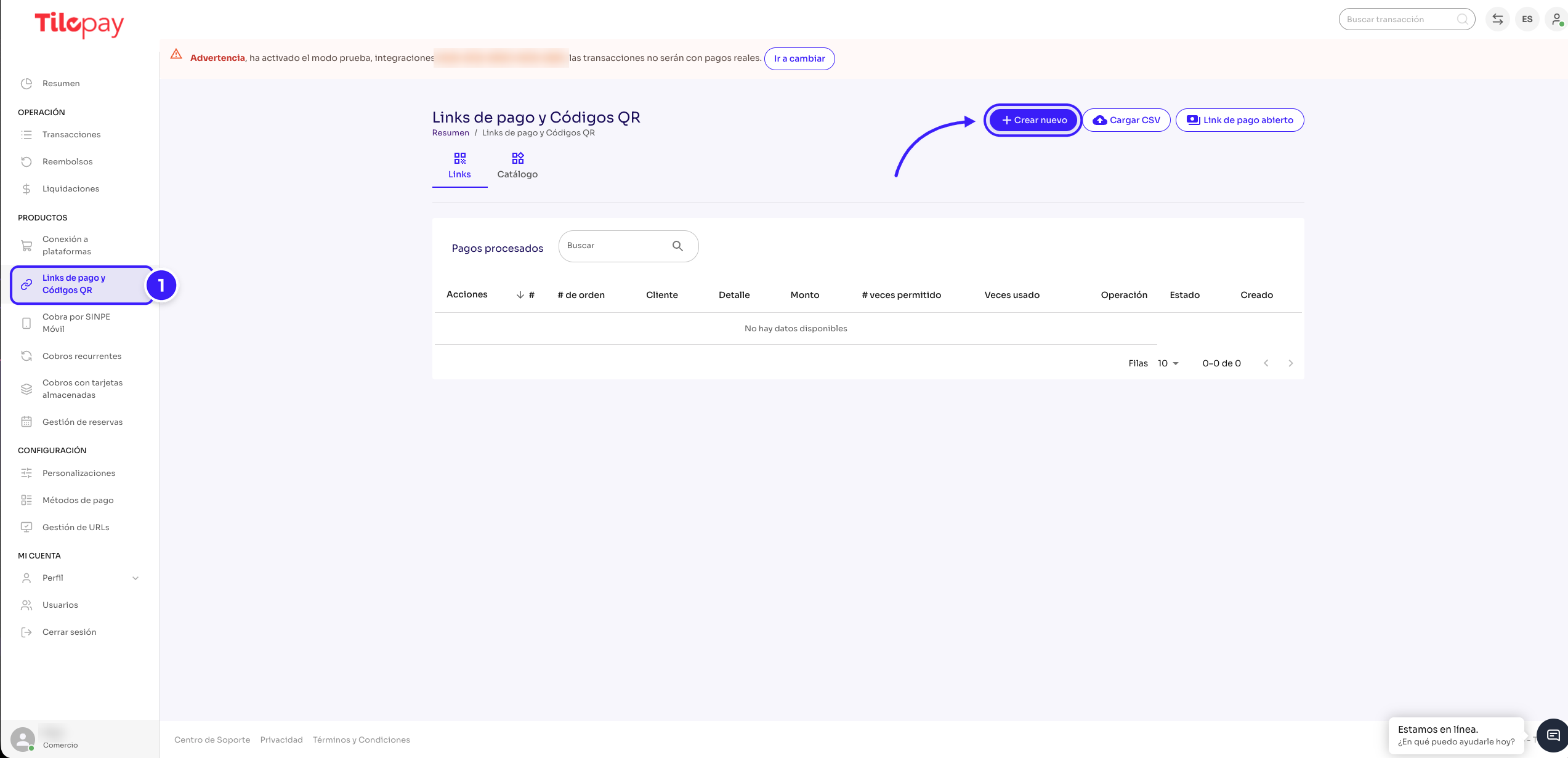
The platform will show you the fields you need to complete. You do not need coding skills or a website integration to get started.
Step 2: Add the description, currency, and amount
Complete the main Payment Link details:
Description: enter a brief description of what you are selling.
Currency: select the applicable currency.
Amount: enter how much your customer needs to pay.
For example:
Description: Black handbag.
Currency: US dollars.
Amount: 35 USD.
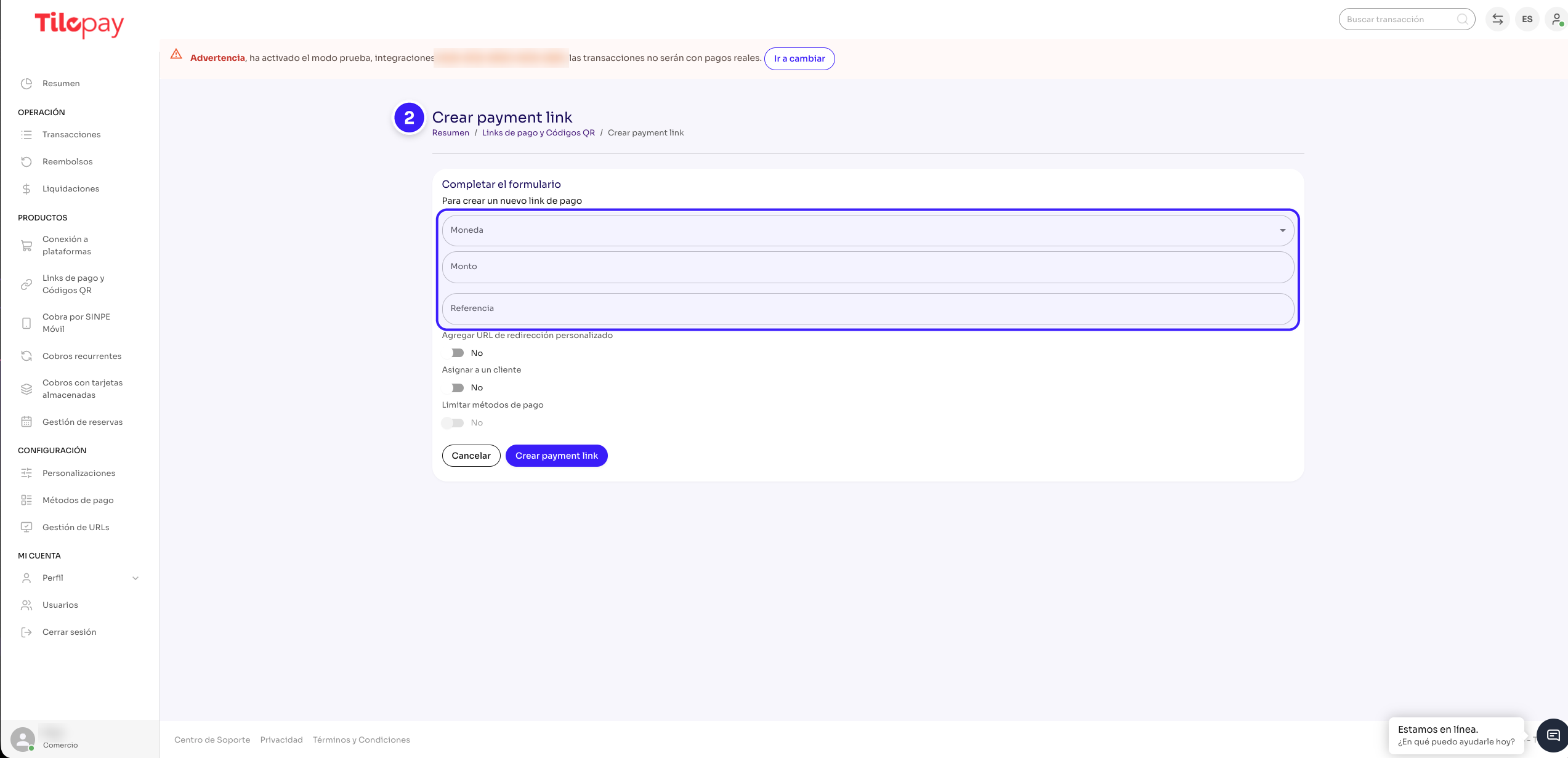
Before continuing, make sure the information is correct. An error in the amount or currency could cause confusion and require you to create a new link.
Step 3: Configure how the Payment Link will be used and generate the link
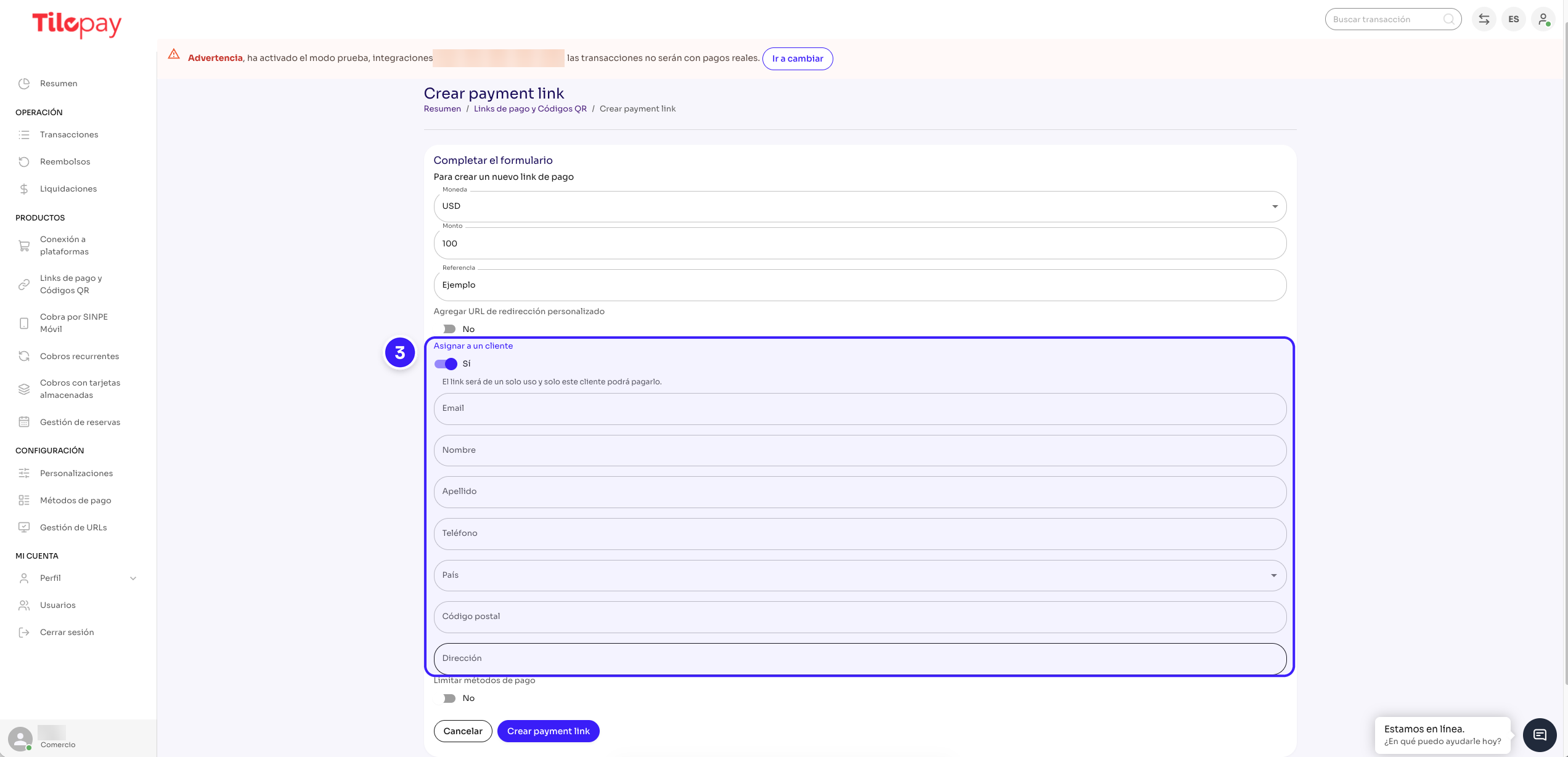
Before generating the Payment Link, decide whether it is for a specific customer's purchase. If so, enable the “Assign to a customer” option and enter their information. This associates the link with that customer.
If several customers will purchase the same product for the same amount, you can leave this option disabled and share the same Payment Link with everyone. This is useful for social media campaigns or fixed-price products at a fair.
Once the information is complete, select “Create payment link” to generate the link.
Before Black Friday or Christmas promotions, preparing a link for a fixed-price offer can save you steps when inquiries start coming in.
Tilopay also offers an Open Payment Link, which you can share with different customers so each person can enter the currency, amount, and description for their payment. This option can be useful at fairs or events when you sell products at different prices.
Step 4: Share the link with your customer
Once the Payment Link is ready, share it through the channel where you are handling the sale: WhatsApp, Instagram, Facebook, TikTok, or email. Include a brief message explaining which product it is for. Confirm the product and amount with your customer before they pay.
On high-volume days such as Cyber Monday, having it ready lets you explain how to pay without creating payment instructions from scratch each time.
Step 5: Your customer completes the payment
Your customer opens the Payment Link from their phone or computer and follows the instructions. From there, they can choose from the payment methods available to your business and complete the requested information.
You should not ask them to share their card information through WhatsApp, email, or phone. They must enter this information directly in the payment form. The PCI Security Standards Council provides recommendations to help businesses protect payment information and avoid receiving or storing card details in personal messages.
Step 6: Confirm that you received the payment
Before handing over, reserving, or shipping the product, verify that the payment appears as approved on the Tilopay platform. Do not rely solely on a screenshot as proof of payment. Once you have verified it, you can continue preparing and fulfilling the order.
Create Payment Links From Your Phone, Wherever You Are
During peak season, you may need to manage several orders, assist customers, or move between different points of sale. Creating Payment Links should not require you to be in front of a computer. In December, for example, you may need to send a payment request while handling a delivery, reservation, or special event.
In addition to the Tilopay admin dashboard, you can create and share Payment Links from the Tilopay Comercios App on your phone, without logging in to the dashboard. If you have the Tilopay WhatsApp Assistant enabled, you can also request Payment Links for the amount you need by sending a message.
With the WhatsApp Assistant, you can also create a catalog that syncs with Facebook, Instagram, WhatsApp Business, TikTok, Pinterest, and Google to display your products on different platforms and make them easier to purchase using Payment Links.
Accept Payments at Fairs and Events With QR Codes
If you participate in a fair or event and cannot accept card payments in person, you can generate a QR Code from Tilopay. Your customer simply needs to scan it with their phone's camera and follow the steps to pay. At Christmas fairs, where many purchases are decided on the spot, offering this alternative can help you serve more customers.
When you sell a product at a fixed price, you can create the QR Code with a preset amount. If the total changes depending on the purchase, you can display a QR Code linked to the Open Payment Link, where your customer enters the currency, amount, and description for their payment.
During Christmas fairs and events, this feature lets you offer an additional way to pay without using cash. You can also share your links through the digital channels where you assist your customers.
Prepare Your Business for Black Friday, Cyber Monday, and Christmas
Peak season can bring a higher volume of orders, inquiries, and sales opportunities. That is why preparing your payment methods ahead of time is just as important as organizing your catalog, inventory, or promotions.
Have Your Payment Links Ready Before Key Sales Dates
If you have products or promotions with set prices, you can create their links ahead of time and keep them ready to share when orders start coming in. This lets you spend less time preparing each payment request and more time assisting your customers.
Make It Easier to Buy From Your Sales Channels
During Black Friday, Cyber Monday, and Christmas, your customers may discover your products through Instagram, Facebook, TikTok, or WhatsApp. By sharing Payment Links through these channels, you give them an easy way to complete their purchase without needing a website.
You can also accept cards and digital wallets such as Apple Pay and Google Pay, making it easier for each customer to choose from the available methods.
Capture More Opportunities Without Monthly Fees
Payment Links have no monthly fees or fixed costs. This means you can accept digital payments during peak season without taking on an additional monthly fee. You pay for each completed sale.
A Simple Way to Sell Without a Website
Selling without a website does not have to limit the payment options you offer. With Payment Links, your customer can pay for a purchase started through WhatsApp, social media, email, or at a fair.
The Tilopay Payment Link and QR Code lets you share a link directly with your customer or display a QR Code so they can pay from their phone. You can also create your links from the dashboard, the Tilopay Comercios App, or the WhatsApp Assistant.
With Black Friday, Cyber Monday, and Christmas approaching, now is a good time to prepare how you will accept customer payments. Having your Payment Links ready will help you capture the opportunities this season and provide a faster, more complete shopping experience.
This season, sell more with Payment Links.