
One-Page Checkout Strategy
Equipo Tilopay · 15 de octubre de 2024

Create a one-page checkout strategy with Tilopay and Shopify for Panama. Simplify the checkout process and reduce your cart abandonment rate.
The online shopping experience has evolved significantly, and one of the most prominent trends is the implementation of one-page checkout.
This approach streamlines the checkout process, reduces the cart abandonment rate, and improves customer satisfaction.
<< Fast, secure, and hassle-free online payments for your business >>
What is one-page checkout?
One-page checkout is a completely redesigned checkout process in Shopify that transforms the traditional three-page flow into a unified, streamlined experience.
This approach gives shoppers a faster, easier way to complete their purchases by removing the obstacles that often cause customers to abandon their carts.
Advantages of one-page checkout
One-page checkout lets customers complete their purchase in a single step. This strategy simplifies the checkout process by bringing all the necessary information together on a single page. The advantages are clear:
1. Less friction: Removing multiple steps makes it easier to complete a purchase, which can increase conversions.
2. Greater clarity: Customers can clearly and concisely view all their order details and associated costs.
3. Mobile optimization: This approach is ideal for mobile users, who need a simple and fast experience.
Benefits of one-page checkout
1. Lower cart abandonment rate: In highly competitive markets, a complicated checkout process can drive potential customers away. One-page checkout helps retain shoppers by simplifying their experience.
2. Mobile-friendly design: With a growing number of purchases made on smartphones, a mobile-optimized design is essential. One-page checkout is designed to work seamlessly on mobile devices, ensuring a smooth user experience regardless of the device.
3. Shopper information recognition: The new checkout experience can prefill details for returning customers, making the process even faster and easier.
4. Improved data analytics: A simpler process also makes it easier to collect analytics data. You can gain valuable insights into purchasing behavior and adjust your strategies accordingly.
To get the most out of Shopify One Page Checkout, you need a payment gateway that integrates natively and supports the region's markets. The solution: Tilopay.
How do you set up Tilopay for Shopify?
Follow these steps to set up Tilopay on Shopify for your store:
1. Log in to https://apps.shopify.com/?locale=es using the same email address you used to set up your Shopify account.
2. Once you're logged in, go to our plugin's Shopify page. You can find it at the following link: https://apps.shopify.com/tilopay?locale=es .
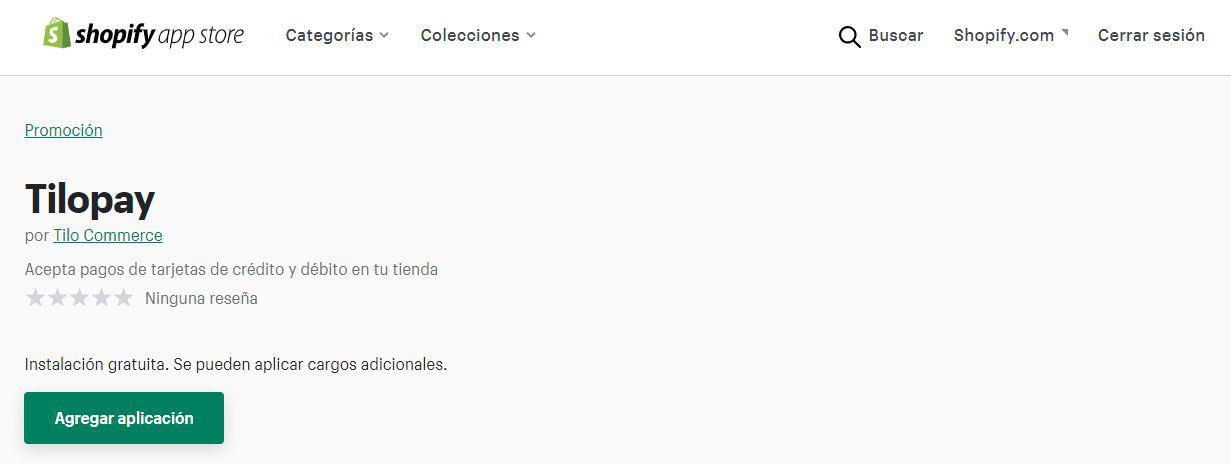
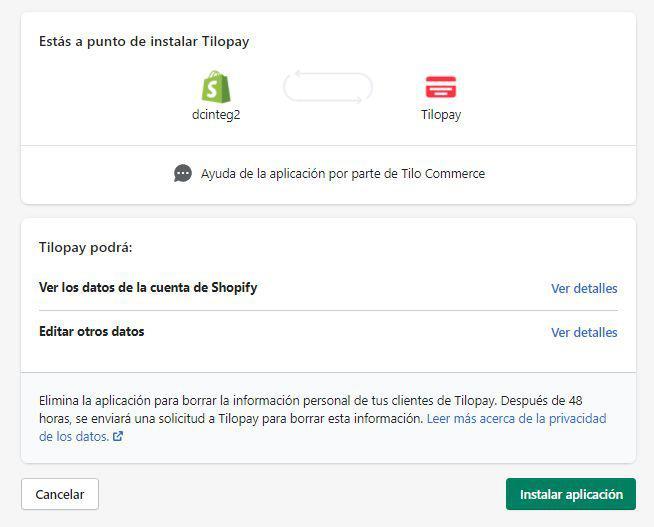
3. Next, click the “Add app” button and follow the on-screen instructions. When the “Install app” button appears, click it.
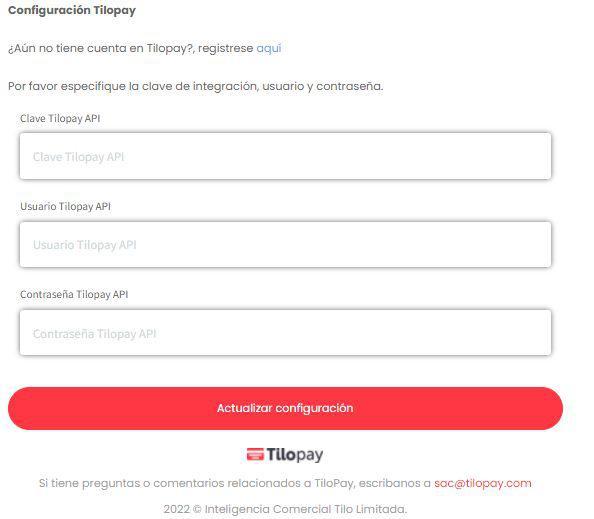
4. After installing the app and following the on-screen instructions, you'll need to enter the integration API credentials generated through the Tilopay user dashboard. After entering the credentials, click “Update settings” to save your settings.
5. You'll then be redirected to the plugin settings, where you'll need to click “Activate Tilopay” in the bottom-right corner of the screen. Here, you can also enable or disable the card brands you want to process and turn test mode on or off.
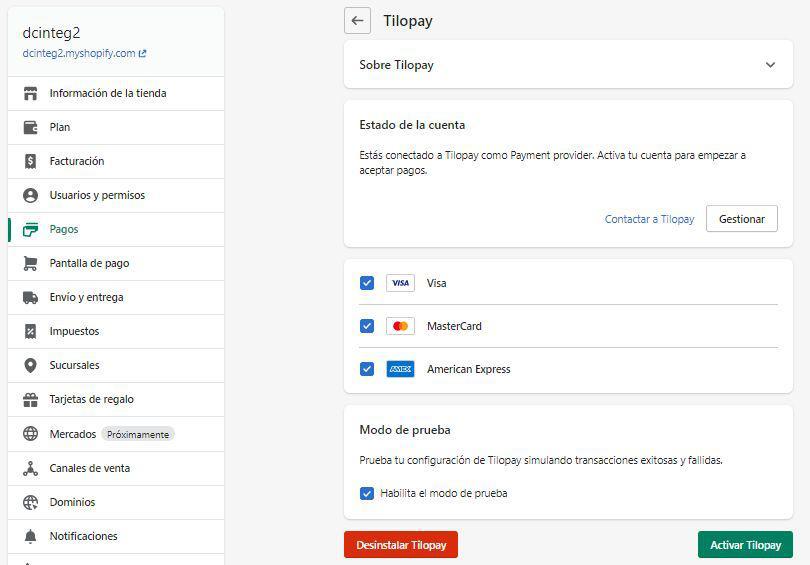
a. Test mode: This mode lets you run test transactions with test cards in Shopify. You must also change the integration environment in the Tilopay user dashboard.
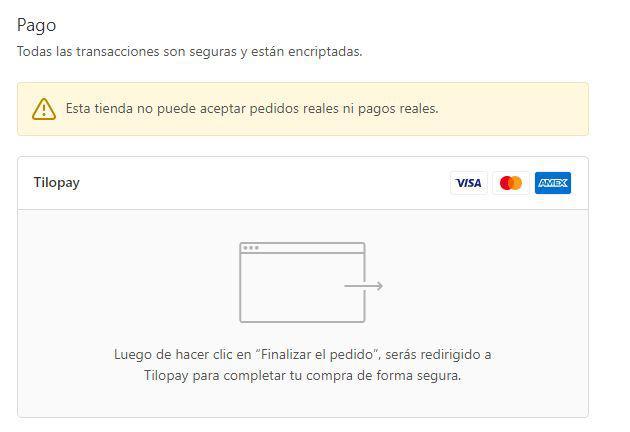
6. Once activated, you should see Tilopay as an option in the “Payments” section of the checkout page.
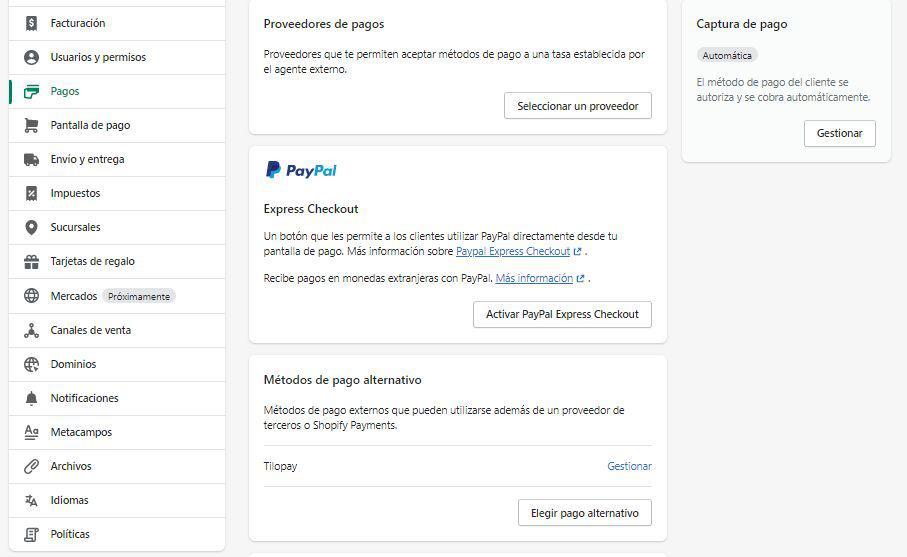
7. If you want to adjust the plugin settings, you can find it under the “Alternative payment method” section of the “Payments” tab in the Shopify admin. Click “Manage” to make the necessary changes to the plugin's functionality. When you're done, click the “Save” button to save your changes.
Shopify's one-page checkout, combined with the Tilopay integration, provides a powerful solution for improving the customer experience at online stores in Panama.
This approach not only reduces friction in the purchasing process but also helps merchants maximize conversions and adapt to an ever-changing ecommerce environment.
You can create your Tilopay account here. It takes less than five minutes. With no monthly fees or fixed costs, you can start accepting online payments today and withdraw funds to your local bank account.