
¿Cómo integrar el SDK V2 Tilopay?
Diseña un flujo de pago único que garantice una experiencia de compra fluida y sin fricciones, manteniendo siempre la robustez y seguridad que caracteriza a Tilopay para maximizar tus ventas. Esta integración específica está diseñada para ser implementada con conocimientos básicos o intermedios en HTML y JavaScript. Tendrás todo lo necesario para integrar nuestra tecnología y cuidar la tranquilidad de tus clientes en cada clic. ¿Prefieres algo más sencillo? No te preocupes, también contamos con soluciones listas para usar que no requieren ni una sola línea de código.
Paso 1:
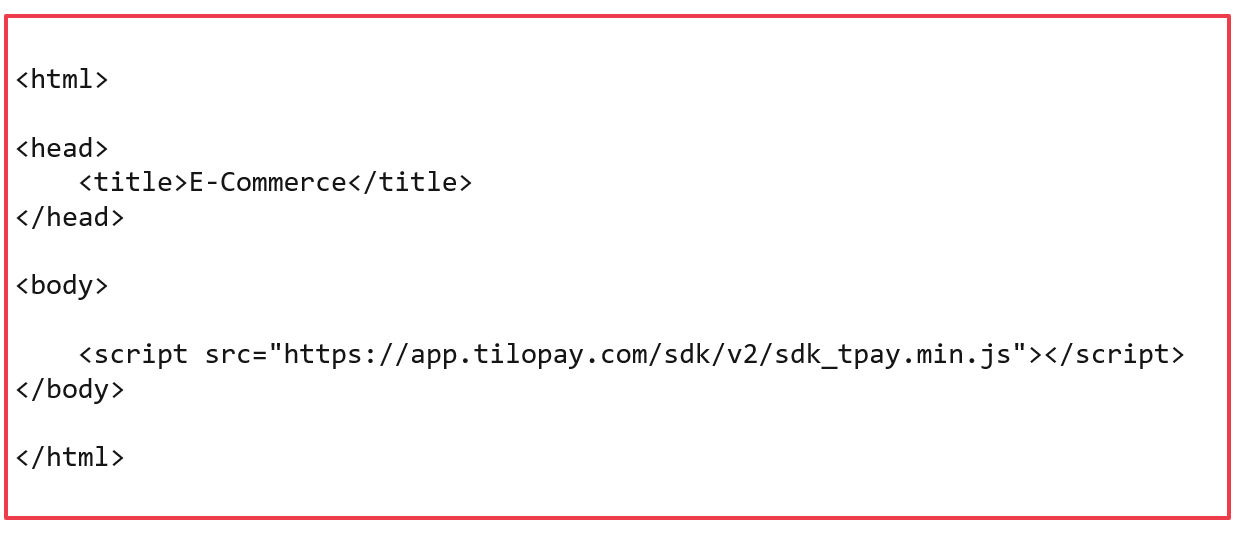
Importar las librerías requeridas, aquí puede establecer el diseño, colores y estilos que desee acorde a su plataforma. Se requiere de la librería Jquery y sdk de Tilopay:
https://app.tilopay.com/sdk/v2/sdk_tpay.min.js
Paso 2:
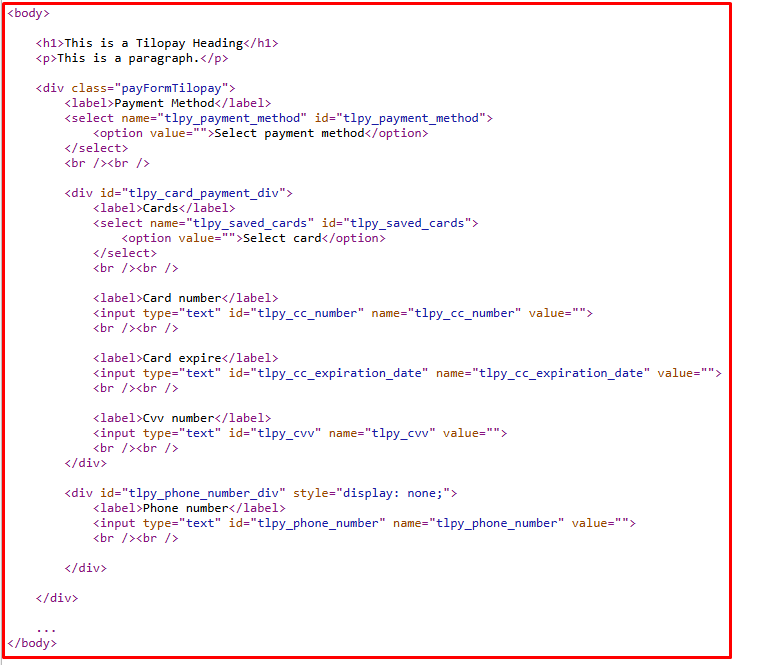
Crear estructura requerida para los datos de pago. Los campos requeridos son los siguientes:
tlpy_payment_method
Este campo puede ser tipo text o select, en su valor debe contener el id del método de pago obtenido de Tilopay, puede estar visible u oculto a discreción del comercio.
tlpy_saved_cards
Este campo debe ser tipo select, en su valor debe contener el id de la tarjeta guardada obtenida de Tilopay, en caso de no tener tarjetas guardadas debe ocultarse al usuario.
tlpy_cc_number
Campo de tipo text donde el usuario debe digitar el número de tarjeta.
tlpy_cc_expiration_date
Campo de tipo text donde el usuario debe digitar la fecha de expiración en forma mes/año (01/25).
tlpy_cvv
Campo de tipo text donde el usuario debe digitar el código de seguridad de la tarjeta.
tlpy_phone_number
Campo donde el usuario debe digitar el número de teléfono Yappy, simepre y cuando se utilice el medio de pago Yappy, caso contrario debe estar oculto.
Requerido
Estos campos mencionados, deben estar dentro de un div principal con la clase “payFormTilopay”, asu vez este div debe contener dos divs, uno con id “tlpy_card_payment_div” para los datos de tarjeta y otro div con id “tlpy_yappy_payment_div” que es para los datos de Yappy, esto para que se le facilite al usuario las opciones según el medio de pago seleccionado.
Ejemplo como debe lucir la estructura html:
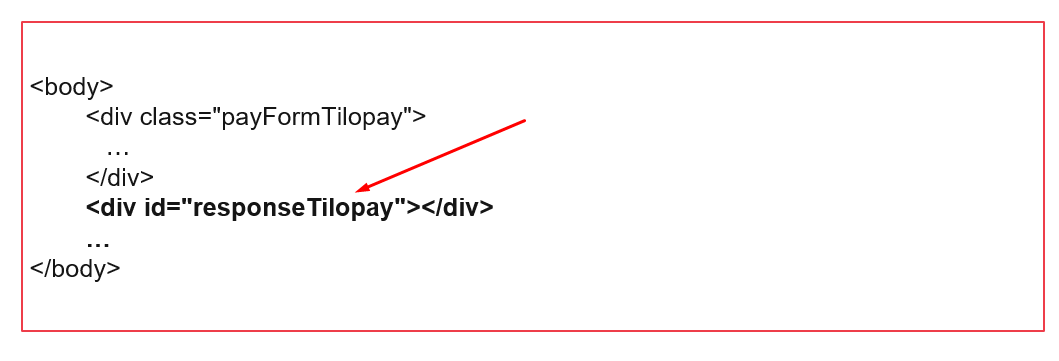
Adicional requiere agregar un contenedor con el id “responseTilopay”, su función será llevar a cabo el proceso de 3ds en caso que el método de pago así lo requiera.
Paso 3:
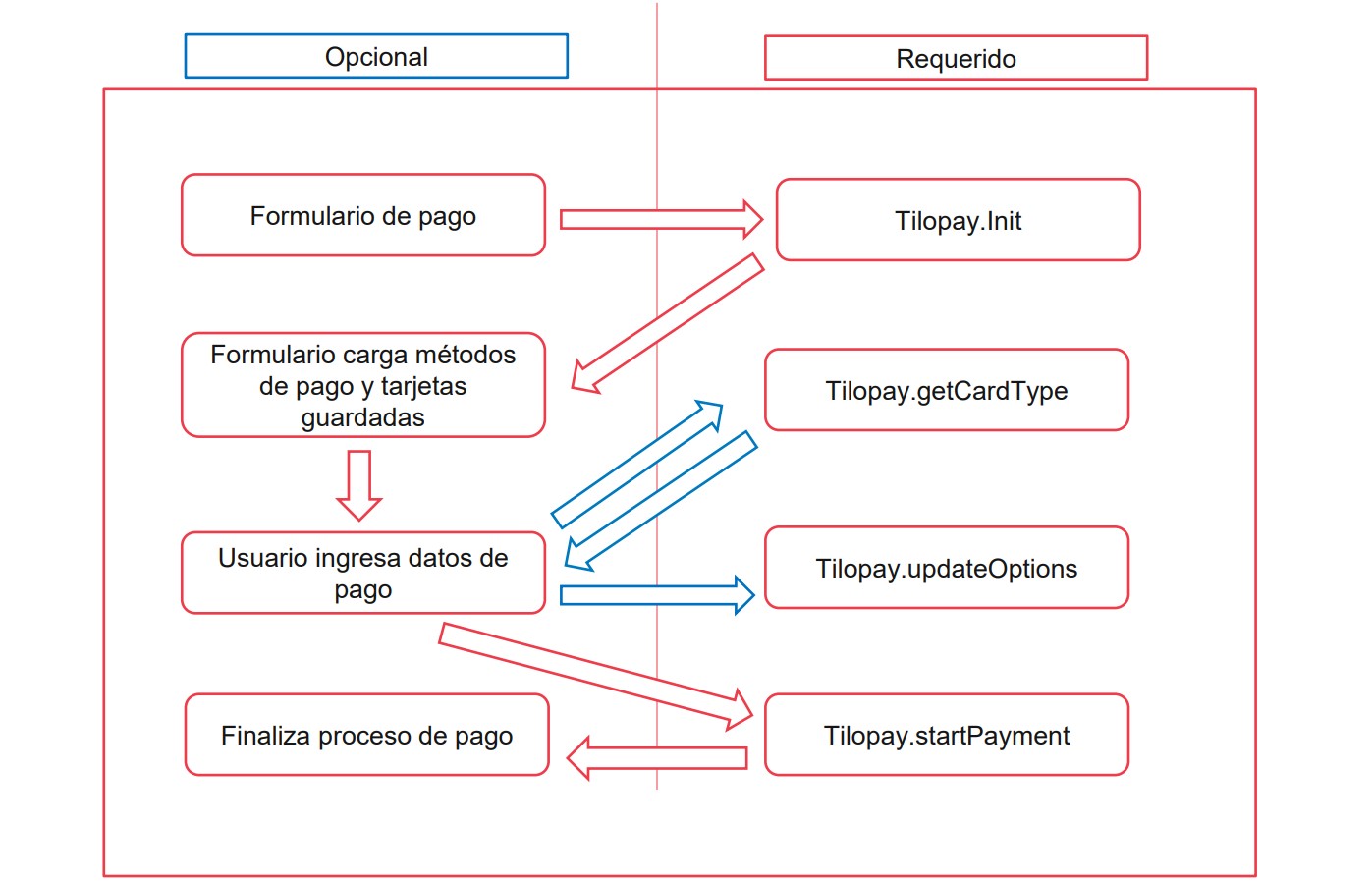
Implementar interacción con el SDK de Tilopay, para ello se establecen varias funciones para el manejo del proceso de compra por medio de Tilopay:
Función: await Tilopay.Init()
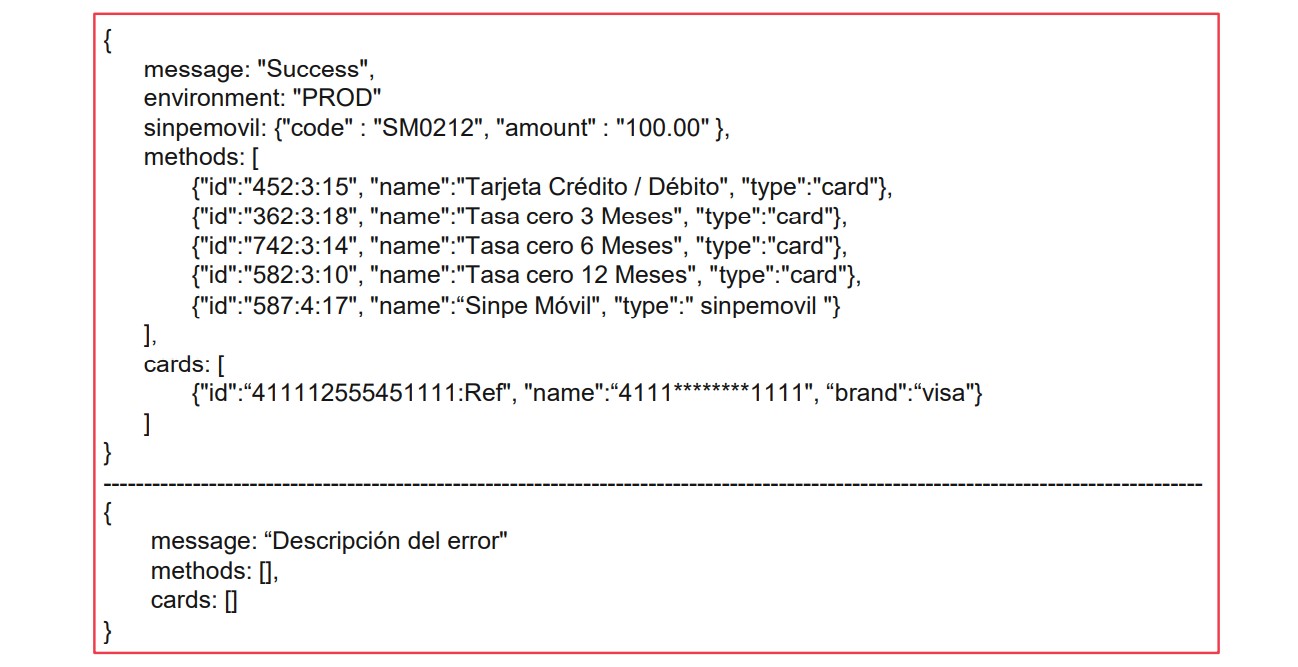
Inicialización del método de pago, este recibe una serie de parámetros. Retorna mensaje de error, en caso de existir, y retorna los métodos de pago disponibles.
Función: await Tilopay.getCardType()
Método para obtener el tipo de tarjeta que ingreso el usuario. Retorna el tipo de tarjeta visa – mastercard – amex.
Función: await Tilopay.getSinpeMovil()
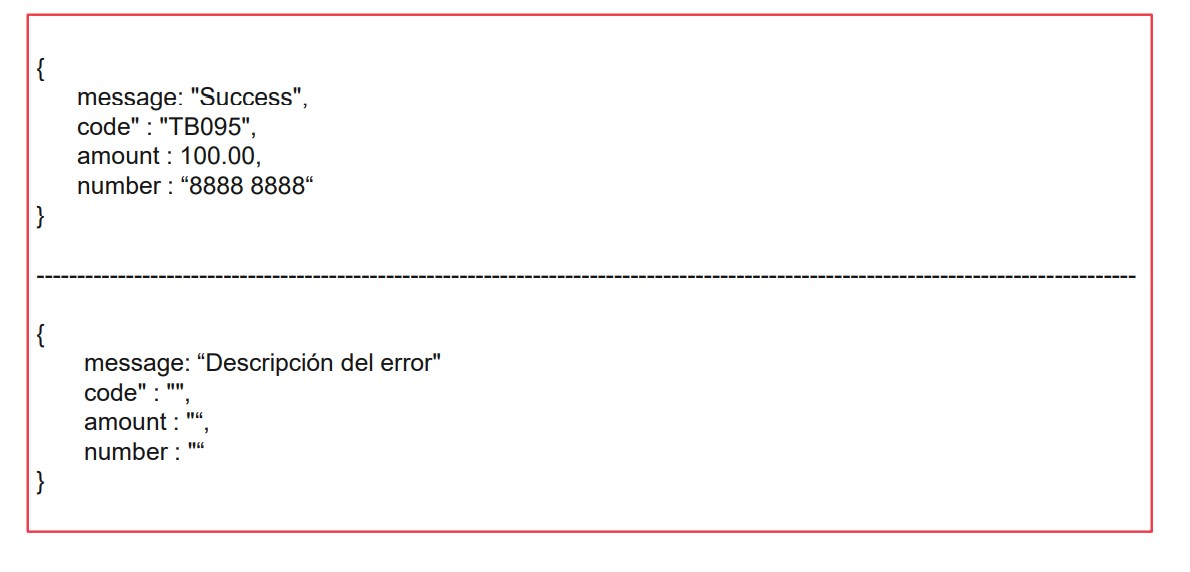
Método para obtener datos de pago para el método Sinpe Móvil. Retorna mensaje de error en caso de existir, y retorna los parámetros de Sinpe Móvil.
Función: await Tilopay.updateOptions()
En caso de ser necesario, con este método puede recargar los valores necesarios para realizar el proceso de pago. Retorna mensaje Success o descripción del error ocurrido.
Función: await Tilopay.startPayment()
Método para enviar a procesar el pago en Tilopay, no recibe ningún parámetro. Retorna mensaje de error en caso de existir.
Función: await Tilopay.Init()
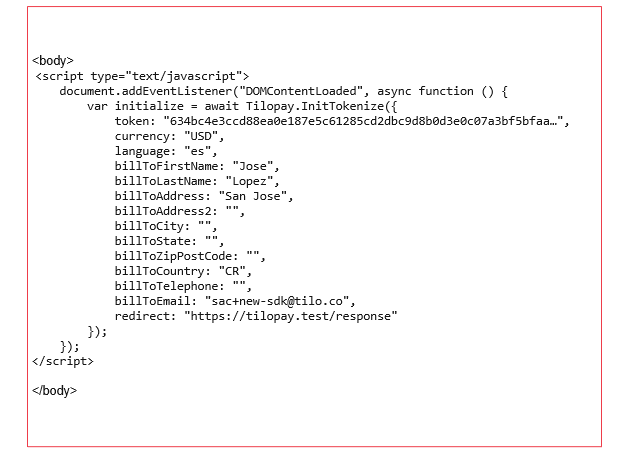
La función await Tilopay.Init(), da inicio al proceso de compra con Tilopay, por medio de el se realiza la autenticación y se reciben los métodos de pago disponibles para la compra. Los parámetros que recibe son los siguientes:
token
Campo obligatorio, tipo string. Token obtenido del método, GetTokenSdk del Api Tiliopay.
currency
Campo obligatorio, tipo string, logitud de 3 caracteres. Códigos de divisa ISO 4217, ejemplo CRC, USD. Moneda de la compra.
language
Campo obligatorio, tipo string, logitud de 2 caracteres. Códigos ISO 639-1, ejemplo: en, es. Moneda de la compra.
amount
Campo obligatorio, tipo decimal, logitud de 12,2 caracteres. Monto de la compra.
billToEmail
Campo obligatorio, tipo string. Correo electrónico del cliente.
orderNumber
Campo obligatorio, tipo string puede ser alfanumérico, de valor único, no se puede repitir por comercio. Número de orden, ejemplo: 1001, TPY-1001, xbkshHwqrKjs98.
typeDni
Campo condicionado, tipo integer. Tipo de identificación (obligatorio para sinpe movil). Ver tabla tipos de identificación.
dni
Campo condicionado, tipo string. Número de identificación del cliente (obligatorio para sinpe movil).
billToFirstName
Campo obligatorio, tipo string. Nombre del cliente.
billToLastName
Campo obligatorio, tipo string. Apellidos del cliente.
billToAddress
Campo obligatorio, tipo string. Dirección 1 del cliente.
billToAddress2
Campo opcional, tipo string. Dirección 2 del cliente.
billToCity
Campo recomendado, tipo string. Ciudad del cliente.
billToState
Campo recomendado, tipo string. Estado del cliente.
billToZipPostCode
Campo recomendado, tipo string. Código postal del cliente.
billToCountry
Campo recomendado, tipo string. País del cliente, ISO 3166-1 dos caracteres, ejemplo CR, FR, PA.
billToTelephone
Campo recomendado, tipo string. Teléfono del cliente.
capture
Campo obligatorio, tipo integer. Indica si desea autorizar mediante un 0 (cero) o capturar mediante un 1 (uno) la compra.
redirect
Campo obligatorio, tipo string. Url (callback) donde se espera la respuesta final de la compra.
subscription
Campo obligatorio, tipo integer. Indica si el cliente desea guardar su tarjeta en Tilopay, 1 (uno) para si, 0 (cero) para no.
phoneYappy
Campo obligatorio, cuando el cliente desea pagar con Yappy.
Ejemplo de llamado al método await Tilopay.Init()
Ejemplo de respuesta método await Tilopay.Init()
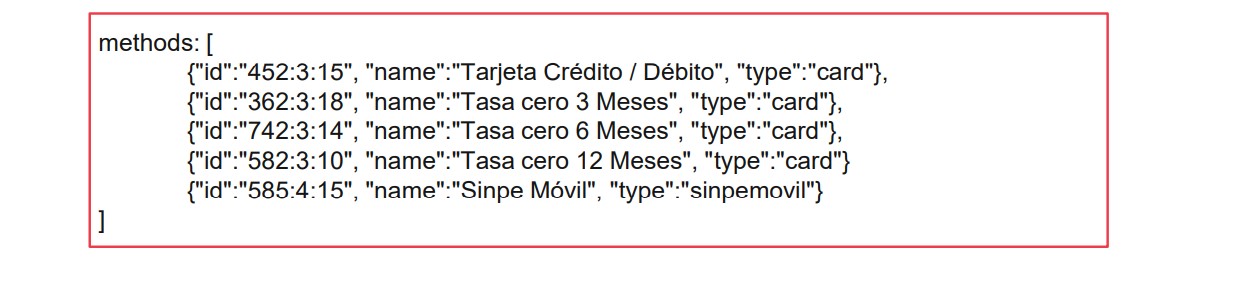
Métodos de pagos
Se listarán los métodos de pago disponibles del comercio para poder realizar el pago, incluye métodos de pago con tarjeta, Yappy y Sinpe Móvil.
Tarjetas guardadas del usuario
Se listarán las tarjetas que posee disponibles el usuario para proceder a realizar el pago.
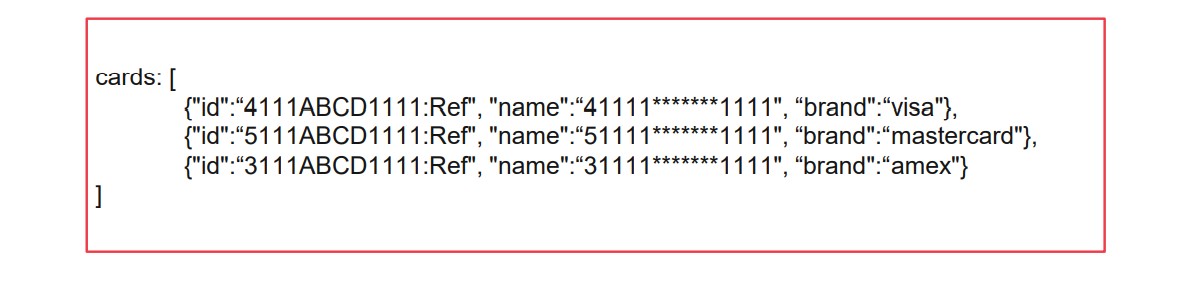
Las tarjetas deben ser mostradas al usuario para que pueda seleccionar una de ellas, o bien poder ingresar los datos de una nueva tarjeta. El select destinado a las tarjetas debe tener el id cards.
Cuando el cliente utiliza una de las tarjetas guardadas, debe habilitarse el campo cvv para que el cliente pueda digitar el código de seguridad de su tarjeta.
Para obtener las tarjetas del cliente, es obligatorio enviar el parámetro billToEmail con el correo electrónico del cliente al hacer el llamado del método Tilopay.Init(). Tras obtener las tarjetas no se podrá cambiar el correo del usuario por medio del método Tilopay.updateOptions().
Tipos de identificación
Si posee métodos de pago Sinpe Móvil, debe solicitar al usuario y aportar al sdk el tipo de identificación, así como la identificación del cliente, con el fin de identificar más rápidamente el pago realizado por el usuario.
Código 1:
Tipo: cédula de identidad, formato: 0#-####-####, longitud: 10.
Código 2:
Tipo: cédula de jurídica, formato: 3-###-######, longitud: 10.
Código 3:
Tipo: gobierno central, formato: 2-###-######, longitud: 10.
Código 4:
Tipo: institución autónoma, formato: 4-###-######, longitud: 10.
Código 5:
Tipo: extranjero no residente, formato: 9&&&&&&&&&&&&&&&&&&&, longitud: 20.
Código 6:
Tipo: DIMEX, formato: 1########### longitud: 12.
Código 7:
Tipo: DIDI, formato: 5########### longitud: 12.
SINPE Móvil
Para un correcto funcionamiento de Sinpe Móvil se deben seguir algunas reglas distintas al pago con tarjeta.
Enviar los parámetros typeDni y dni por medio del método await Tilopay.Init() ó await Tilopay.updateOptions().
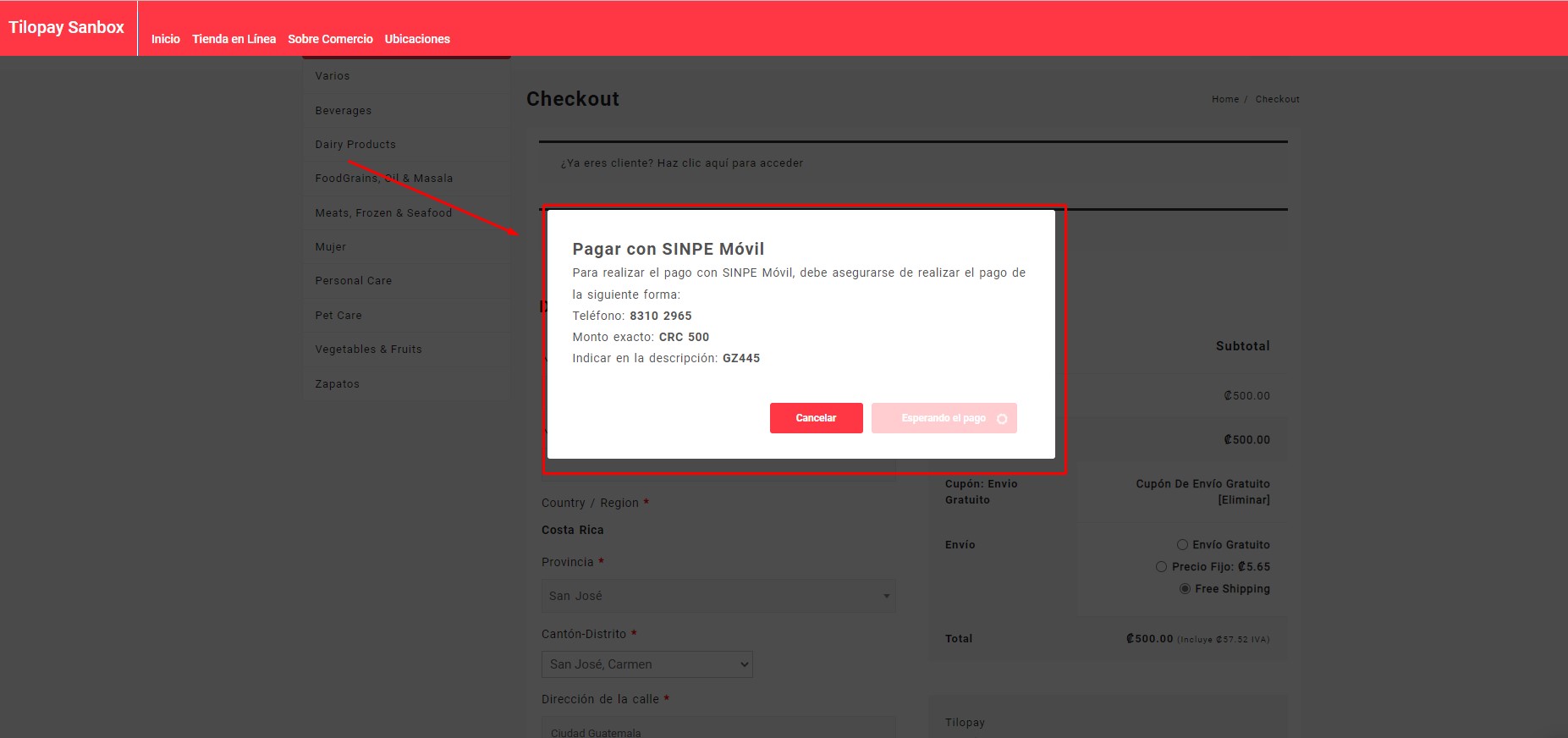
Ocultar al usuario los campos para realizar pagos con tarjeta y en su lugar mostrar al usuario los parámetros de pago SINPE Móvil obtenidos del método await Tilopay.getSinpeMovil() estos parámetros se recomienda mostrar al usuario con un mensaje similar al siguiente:
Para realizar el pago con SINPE Móvil, debe asegurarse de realizar el pago de la siguiente forma:
Teléfono: 8888 8888
Monto exacto: CRC 500,00
Indicar en la descripción: TB095
Con SINPE Móvil no es necesario el botón de pagar, el pago se procesa automáticamente al recibir la transacción realizada por el cliente.
Función await Tilopay.getCardType()
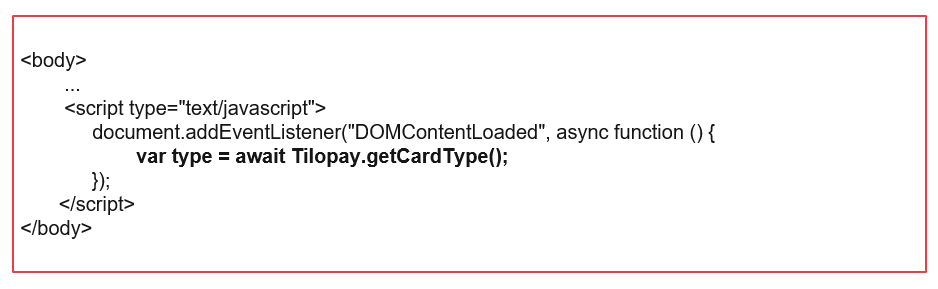
Con la función await Tilopay.getCardType() se obtiene el tipo de tarjeta que el cliente ingreso, puede ser utilizado para indicar al usuario mediante un icono el tipo de tarjeta que esta usando, su uso requiere que el usuario ya haya ingresado el número de tarjeta. Este método no requiere el envió de ningún parámetro. Retorna un mensaje con el valor correspondiente a la marca de la tarjeta.
Tarjetas soportadas:
VISA, MASTERCARD, AMEX.
Tarjetas no soportadas
ELO, VISAELECTRON, MAESTRO, FORBRUGSFORENINGEN, DANKORT, HIPERCARD, DINERSCLUB, DISCOVER, UNIONPAY, JCB, LASER.
Ejemplo de llamado al método await Tilopay.getCardType()
Ejemplo de respuesta método await Tilopay.getCardType()

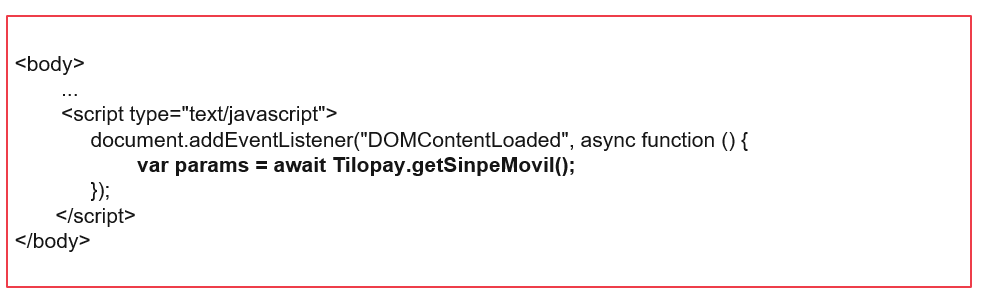
Con la función await Tilopay.getSinpeMovil(), se obtiene los datos a mostrar al usuario para realizar su pago mediante SINPE Móvil, para su uso es necesario que el usuario seleccione como método de pago Sinpe Móvil.
Ejemplo de llamado al método await Tilopay.getSinpeMovil()
Ejemplo de la respuesta del método await Tilopay.getSinpeMovil()
Función await Tilopay.updateOptions()
La función await Tilopay.updateOptions(), puede ser utilizado para actualizar los parámetros del método await Tilopay.Init() que pudieron variar, debe ser utilizado antes de finalizar el pago en caso de requerirse, su uso es opcional. Los valores que pueden ser actualizados son los siguientes:
typeDni
Campo condicionado, tipo integer. Tipo de identificación (obligatorio para sinpe movil). Ver tabla tipos de identificación.
dni
Campo condicionado, tipo string. Número de identificación del cliente (obligatorio para sinpe movil).
billToFirstName
Campo obligatorio, tipo string. Nombre del cliente.
billToLastName
Campo obligatorio, tipo string. Apellidos del cliente.
billToAddress
Campo obligatorio, tipo string. Dirección 1 del cliente.
billToAddress2
Campo opcional, tipo string. Dirección 2 del cliente.
billToCity
Campo recomendado, tipo string. Ciudad del cliente.
billToState
Campo recomendado, tipo string. Estado del cliente.
billToZipPostCode
Campo recomendado, tipo string. Código postal del cliente.
billToCountry
Campo recomendado, tipo string. País del cliente, ISO 3166-1 dos caracteres, ejemplo CR, FR, PA.
billToTelephone
Campo recomendado, tipo string. Teléfono del cliente.
capture
Campo obligatorio, tipo integer. Indica si desea autorizar mediante un 0 (cero) o capturar mediante un 1 (uno) la compra.
redirect
Campo obligatorio, tipo string. Url (callback) donde se espera la respuesta final de la compra.
subscription
Campo obligatorio, tipo integer. Indica si el cliente desea guardar su tarjeta en Tilopay, 1 (uno) para si, 0 (cero) para no.
phoneYappy
Campo obligatorio, cuando el cliente desea pagar con Yappy.
Ejemplo de llamado al método await Tilopay.updateOptions()
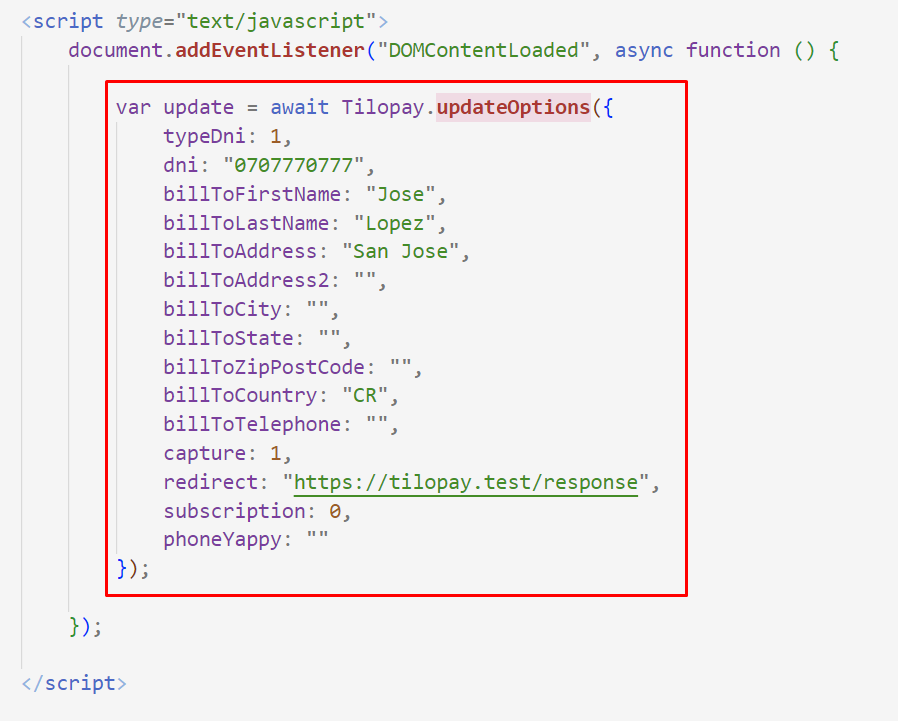
Ejemplo de respuesta método await Tilopay.updateOptions()

Función await Tilopay.startPayment()
La función await Tilopay.startPayment(), se utiliza para finalizar el proceso de compra, con ellos los datos de pago viajaran a Tilopay y se procesarán. En caso de ocurrir un error se indicará en el retorno de este método. Requiere que todos los datos de pago estén completos, sin embargo no requiere envió de parámetros en su llamado.
Ejemplo de llamado al método await Tilopay.startPayment()
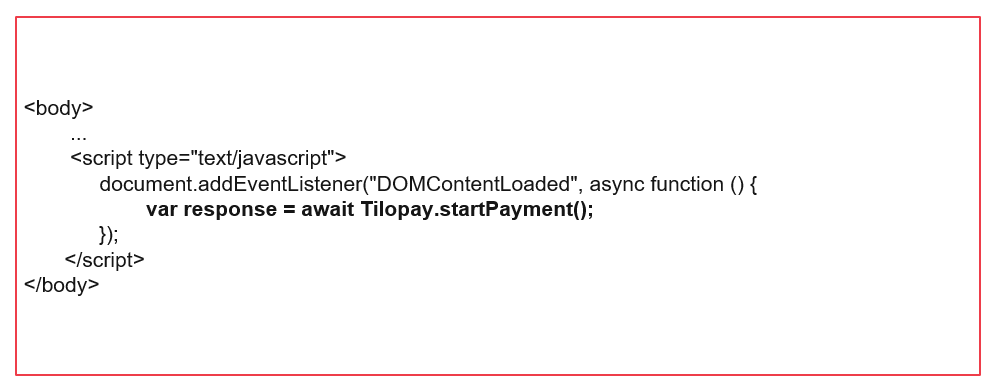
Ejemplo completo de la integración del SDK V2 async/await:
<html>

<head>
    <title>Tilopay SDK DEMO | Basic Form</title>
</head>

<body>

    <h1>This is a Tilopay Heading</h1>
    <p>This is a paragraph.</p>

    <div class="payFormTilopay">
        <label>Payment Method</label>
        <select name="tlpy_payment_method" id="tlpy_payment_method">
            <option value="">Select payment method</option>
        </select>
        <br /><br />

        <div id="tlpy_card_payment_div">
            <label>Cards</label>
            <select name="tlpy_saved_cards" id="tlpy_saved_cards">
                <option value="">Select card</option>
            </select>
            <br /><br />

            <label>Card number</label>
            <input type="text" id="tlpy_cc_number" name="tlpy_cc_number" value="">
            <br /><br />

            <label>Card expire</label>
            <input type="text" id="tlpy_cc_expiration_date" name="tlpy_cc_expiration_date" value="">
            <br /><br />

            <label>Cvv number</label>
            <input type="text" id="tlpy_cvv" name="tlpy_cvv" value="">
            <br /><br />
        </div>

        <div id="tlpy_phone_number_div" style="display: none;">
            <label>Phone number</label>
            <input type="text" id="tlpy_phone_number" name="tlpy_phone_number" value="">
            <br /><br />

        </div>

        <input type="button" onclick="processPayment();" value="Pay">
        <input type="button" onclick="updateTilopaySDKOptions();" value="Reload">
        <input type="button" onclick="getCardBrand();" value="Get Type">
        <input type="button" onclick="getSinpeMovilInstructionsToPay();" value="Get Sinpe Data">
        <input type="button" onclick="getCipherData();" value="Get Cipher Data">
    </div>

    <div id="responseTilopay"></div>

    <!-- First option, as usual -->
    <script src="https://app.tilopay.com/sdk/v2/sdk_tpay.min.js"></script>
    <!-- Second option, recommend if you want avoid cache or are integrate angular or similar framework-->
    <!-- <script>
        var tlpy_SDK_script = document.createElement('script');
        tlpy_SDK_script.src = "https://app.tilopay.com/sdk/v2/sdk_tpay.min.js?v=" + Date.now();
        document.body.appendChild(tlpy_SDK_script);
    </script> -->

    <script type="text/javascript">

        // SDK on Ready document
        document.addEventListener("DOMContentLoaded", async function () {

            // Initialize Tilopay SDK
            var initialize = await Tilopay.Init({
                token: '',
                currency: "USD",
                language: "es",
                amount: 1,
                billToFirstName: "Jose",
                billToLastName: "Lopez",
                billToAddress: "San Jose",
                billToAddress2: "",
                billToCity: "",
                billToState: "",
                billToZipPostCode: "",
                billToCountry: "CR",
                billToTelephone: "",
                billToEmail: "your-email@example.com",
                orderNumber: "sdk-" + Date.now(),
                capture: 1,
                redirect: "https://tilopay.test/response",
                subscription: 0,
                hashVersion: "V2",
                returnData: "W2N1c3RvbV9wYXJhbWV0ZXJfYSA9PiAidmFsb3IgZGUgYSIsY3VzdG9tX3BhcmFtZXRlcl9iID0+ICJ2YWxvciBkZSBiIl0=" // base 64 array [custom_parameter_a => "valor de a",custom_parameter_b => "valor de b"]
            });

            await loadPaymentMethodsOptions(initialize.methods);
            await loadCardOptions(initialize.cards);

            /**
             * Called when the user changes the payment method.
             * If the new method is Yappy, hide the card number, expiration and CVV
             * inputs and show the phone number input. Otherwise, show the card
             * number inputs and hide the phone number input.
             * @param {Event} e The change event.
             */
            document.getElementById("tlpy_payment_method").onchange = async function (e) {
                var method = document.getElementById("tlpy_payment_method").value;
                if (method) {
                    const splitMethods = method.split(':');
                    const showInputs = (splitMethods[1] == '18');
                    const tlpy_card_payment_div = document.getElementById("tlpy_card_payment_div");
                    if (tlpy_card_payment_div && showInputs) {
                        tlpy_card_payment_div.style.display = 'none';
                    } else {
                        tlpy_card_payment_div.style.display = 'block';
                    }
                    const tlpy_phone_number_div = document.getElementById("tlpy_phone_number_div");
                    if (tlpy_phone_number_div && showInputs) {
                        tlpy_phone_number_div.style.display = 'block';
                        // Update phone yappy to process the payment
                        await setYappyPhone();
                    } else {
                        tlpy_phone_number_div.style.display = 'none';
                    }
                }

            };

        });

        /**
         * Function to update the yappy phone number in the Tilopay object
         * This function is called when the user change the phone number in the form
         * @return {Promise<void>}
         */
        async function setYappyPhone() {
            document.getElementById("tlpy_phone_number").onchange = async function () {
                var phone = document.getElementById("tlpy_phone_number").value;
                if (phone) {
                    var update = await Tilopay.updateOptions({
                        phoneYappy: document.getElementById("tlpy_phone_number").value,
                    });
                }
            }
        }

        /**
         * Example of how to get the card brand
         * @return {Promise<string>}
         */
        async function getCardBrand() {
            console.log(await Tilopay.getCardType());
        }

        /**
         * Function to update the options for the Tilopay object
         * This function is called when the user clicks on the "Update options" button
         * @return {Promise<void>}
         */
        async function updateTilopaySDKOptions() {
            var update = await Tilopay.updateOptions({
                typeDni: 1,
                dni: "07-0777-0777",
                billToFirstName: "Jose",
                billToLastName: "Lopez",
                billToAddress: "San Jose",
                billToAddress2: "",
                billToCity: "",
                billToState: "",
                billToZipPostCode: "",
                billToCountry: "CR",
                billToTelephone: "",
                billToEmail: "dcordero@tilo.co",
                orderNumber: "1",
                capture: 1,
                redirect: "https://tilopay.test/response",
                subscription: 0
            });
        }

        /**
         * Populates the payment method dropdown with options.
         *
         * @param {Array} methods - An array of payment method objects, each containing an 'id' and 'name'.
         * The function creates an <option> element for each method and appends it to the select element
         * with the id "tlpy_payment_method".
         */
        async function loadPaymentMethodsOptions(methods) {
            methods.forEach(function (method) {
                var option = document.createElement("option");
                option.value = method.id;
                option.text = method.name;
                document.getElementById("tlpy_payment_method").appendChild(option);
            });
        }

        /**
         * Populates the saved card dropdown with options.
         *
         * @param {Array} cards - An array of card objects, each containing an 'id' and 'name'.
         * The function creates an <option> element for each card and appends it to the select element
         * with the id "tlpy_saved_cards".
         */
        async function loadCardOptions(cards) {
            cards.forEach(function (card) {
                var option = document.createElement("option");
                option.value = card.id;
                option.text = card.name;
                document.getElementById("tlpy_saved_cards").appendChild(option);
            });
        }

        /**
         * Function to get the instructions to pay with sinpe movil
         *
         * This function will return the instructions to pay with sinpe movil, it will return an object with the following properties:
         * - message: A string with the instructions to pay with sinpe movil
         * - code: A string with the code of the payment
         * - amount: A number with the amount of the payment
         * - number: A string with the number of the payment
         *
         * It will console.log the instructions to pay with sinpe movil
         *
         * @return {Promise<void>}
         */
        async function getSinpeMovilInstructionsToPay() {
            var params = await Tilopay.getSinpeMovil();
            console.log(params);
        }

        /**
         * Processes the payment.
         *
         * This function will call the Tilopay.startPayment() method and log the response to the console.
         *
         * @return {Promise<void>}
         */
        async function processPayment() {
            var payment = await Tilopay.startPayment();
            console.log(payment);
        }

        /**
         * Get the cipher data.
         *
         * This function will call the Tilopay.getCipherData() method and log the response to the console.
         *
         * @return {Promise<void>}
         */
        async function getCipherData() {
            var cipher = await Tilopay.getCipherData();
            console.log(cipher);
        }
    </script>

</body>

</html>